


Problem Creating "New SubFolder" and "New Folder"

Hi,
I have been using Thunderbird as my preferred email client since around 2004 on Linux, macOS and Windows.
I am current running Thunderbird 150.0.2 64-bit on macOS Tahoe 26.5 ( Intel ).
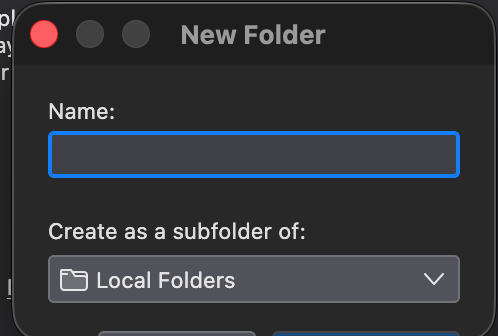
When I attempt to create a new 'Folder' or 'Sub Folder' on either an iMAP account or, more importantly, my 'Local Folder' the displayed dialogue box is sized incorrectly and I am unable to complete the action.
Specifically I can type into the 'Name' text box and see the 'Create as a subfolder of" drop down dialogue but the two buttons below are barely visible and I cannot select either with my mouse. Nor can I resize the dialogue box itself [ make larger ] to enable to be select either button.
I can use the <TAB> key to cycle thorough the various items and the <RETURN> key to select an option.
I have attached a sample image of the issue.
Thanks.
ყველა პასუხი (3)

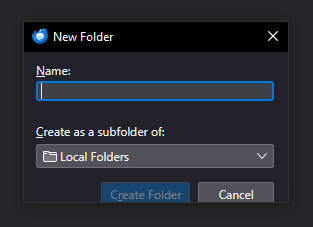
I can confirm that this happens in Windows with Thunderbird 150.0.2, though not as severely as what you see (see image below.) The two buttons are partly out of the dialog box, but at least I can get at them with the mouse. I'd call this an interface bug. Hopefully they are aware of it and I expect it should be an easy fix for them.
Hi,
I can report that the problem described above appears to have disappeared in Thunderbird 151.0 (64-bit) macOS [ Intel ].
The New Folder / Folder dialogue box is now the correct size and all controls accesible.
W.

I cannot create subfolders in win 10, TB version 154