Default "Attachment Save(As) Folder / Directory"

Hi,
Where can I change in the settings the default Attachment Save(As) Folder / Directory. That Folder is also used by extract-em (for "save individual attachments"). On my installation it defaults to c:\user\myname\desktop but I can't find a way to change that location.
Another question : is there a way to disable the standard TB attachment Save(As) (shown at the bottom of a message) and replace it completely by extract-em ?
Thank you
გადაწყვეტა შერჩეულია
wquatan said
Where can I change in the settings the default Attachment Save(As) Folder / Directory. That Folder is also used by extract-em (for "save individual attachments"). On my installation it defaults to c:\user\myname\desktop but I can't find a way to change that location.
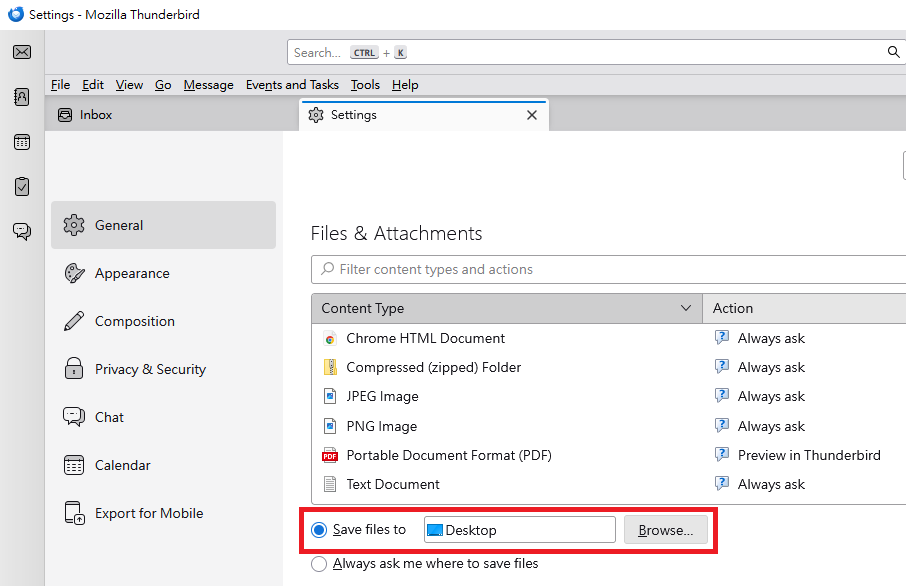
The following steps might be helpful: "Settings" > "General" > "Files & Attachments" section > Choose "Save files to ___". > Click "Browse" and select the folder you prefer.
Please see the attached image.
პასუხის ნახვა სრულად 👍 1ყველა პასუხი (1)

შერჩეული გადაწყვეტა
wquatan said
Where can I change in the settings the default Attachment Save(As) Folder / Directory. That Folder is also used by extract-em (for "save individual attachments"). On my installation it defaults to c:\user\myname\desktop but I can't find a way to change that location.
The following steps might be helpful: "Settings" > "General" > "Files & Attachments" section > Choose "Save files to ___". > Click "Browse" and select the folder you prefer.
Please see the attached image.