Scanner won't recognize Thunderbird as the default application

I had to reinstall Thunderbird after getting an update/error message. After reinstalling it, my ScanSnap scanner won't send to my email anymore. I have reset all my settings to what they should be but it still won't scan to my email. The error message I get is "Either there is no default mail client or the current mail client cannot fulfill the messaging request. Please run Microsoft Outlook and set it as the default mail client." I have Thunderbird set as my mail client right now.
ჩასწორების თარიღი: , ავტორი: Wayne Mery
ყველა პასუხი (4)
From Help > About...
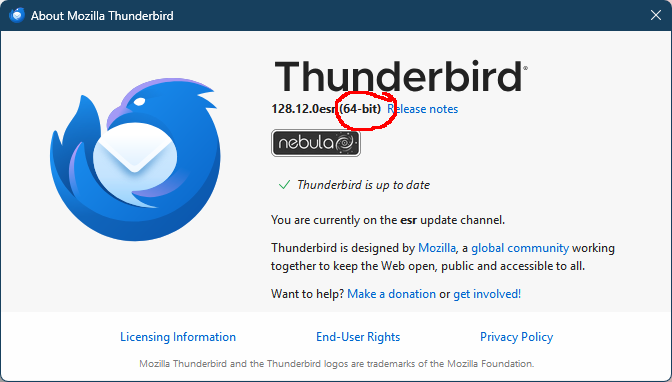
What version of Thunderbird are you using? And is this 32-bit or 64-bit?
Hmm? It says it is version 128.11.1.0
In that case, the focus needs to be getting Thunderbird recognized as the default application, as the error indicates. I'm hoping someone will jump in to assist.
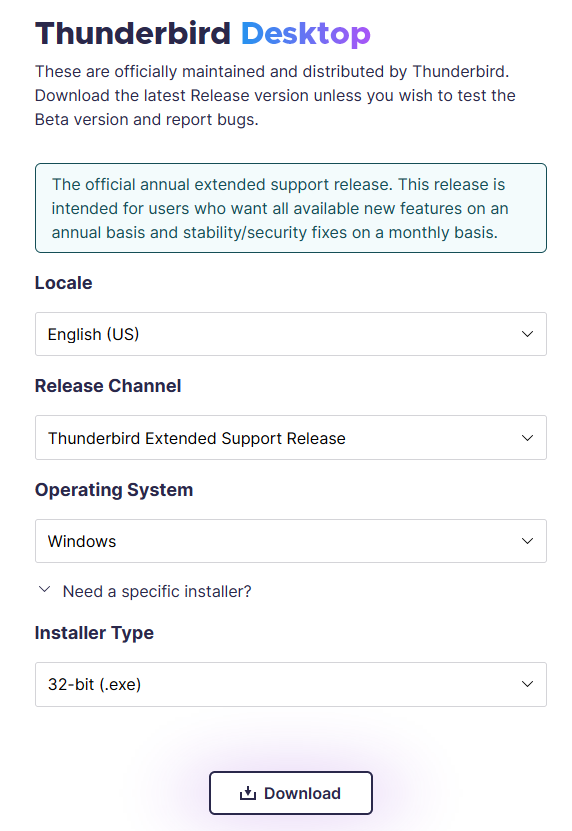
Select Help/About Thunderbird and note if it's 64 or 32-bit (see picture). It's probably 64-bit, and the scanner app is probably 32-bit. Remove the current TB app (profile with user data is not affected), then download the 32-bit installer from here (see picture). Choose your Locale. During the install, set TB as the default mail app.