Zebra stripes (Thunderbird 128, userChrome.css)

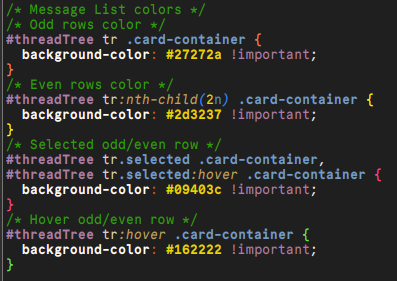
I am using following userChrome.css modification for zebra stripes:
/* Message List colors */ /* Odd rows color */
- threadTree tr .card-container {
background-color: #27272a !important;
} /* Even rows color */
- threadTree tr:nth-child(2n) .card-container {
background-color: #2d3237 !important;
}
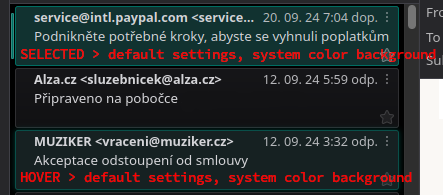
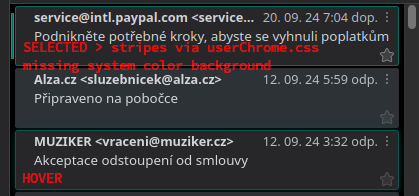
It partly works, but I miss default system color in background, there is only border line. Please see attached images.
Many thanks in advance!
შერჩეული გადაწყვეტა
To set the background colour for selected cards, you can try this:
/* card bg colour for selected messages */
tr[is="thread-card"].selected .card-container {
     background-color: lightgreen !important;
     outline: 1px solid red !important;
}
Replace lightgreen with transparent if desired.
ყველა პასუხი (5)
See https://support.mozilla.org/en-US/questions/1464739#answer-1675906
If you want a solid colour, replace the background-image part with something like:
background-color: lightgrey !important;
I already use "background-color" (please see my first post).
I tried to use "background-image" instead "background-color", but that does not work at all (maybe because I use the KDE Plasma desktop environment?).
Using:
/* Odd rows color */
- threadTree tr .card-container {
background-color: #27272a !important;
} /* Even rows color */
- threadTree tr:nth-child(2n) .card-container {
background-color: #2d3237 !important;
}
works fine, just missing the "top" transparent marking with system color for selected item (there is only border color). Please see attached screens in my first post.
With v115, the "card-container" parameter was not used and everything worked fine (stripes with transparent markings in system color for the selected item).
I am sorry, posting replaces "#" for "1. "
შერჩეული გადაწყვეტა
To set the background colour for selected cards, you can try this:
/* card bg colour for selected messages */
tr[is="thread-card"].selected .card-container {
     background-color: lightgreen !important;
     outline: 1px solid red !important;
}
Replace lightgreen with transparent if desired.
Thank you, that solved my problem.
For completeness I attache my settings.