


New email server. Accounts missing from Unified INBOX
Changed hosts from HostGator to GreenGeeks. Edited the email settings to point to new server, updated the ports etc. Now two of my email accounts aren't shown under the Inbox (unified). These were there and had been for years. Disappeared after changing the email server name and port to the new host's info.
გადაწყვეტა შერჩეულია
My error. It would probably be in the Mail folder, not the Imapmail folder.
პასუხის ნახვა სრულად 👍 2ყველა პასუხი (4)
DO they appear under 'all folders'? If so, my suggestion is to exit TB, in windows file explorer, locate the 'smart mailboxes' folder under imapmail folder, delete it, and restart thunderbird.
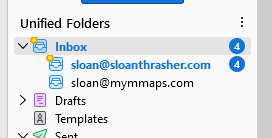
Yes they appear under all folders. They also appear in the list of account settings. I looked on my local pc for the folder you mention, and do not see a folder or file "smart mailboxes" or anything similar. I've attached a couple of screenshots from TB to show the only two accounts under INBOX and the accounts in account settings.

ჩასწორების თარიღი: , ავტორი: Sloan
შერჩეული გადაწყვეტა
My error. It would probably be in the Mail folder, not the Imapmail folder.
Thank you!! That took care of it!