


Addresses
I Use TH 102 on Windows 11 and Android phone.
I have a cardav address book on PC and another one that collected addresses whenn I send mail I also have an addressebook on Gmail with my android. How do I syn and update all this?.
ყველა პასუხი (8)
In Address Book, click New Address Book drop-down, Add CardDAV Address Book, enter gmail account, enter account password in OAuth2 window, 'Address Book' will be added to others in Address Book.
Well, I did that, but the addresses on my phone (gmail) are not copied my PC.
In which PC address book should I fond them?
I just added the gmail Contacts as above, and a new 'Address Book' appeared in TB's Address Book (see picture).
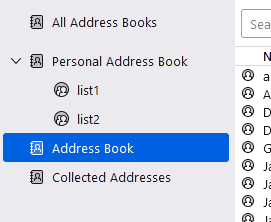
Sorry I must have done somthing wrong. Did a seond time and indeed Address book appears with the gmail addresse.
Now, How do I syn this with Cardbook?
Cardbook has its own address books. The gmail contacts can also be added (synced) in Cardbook if necessary (New address book, Remote...).
Because Google syncs between my PC and my Android, I would prefer to inject the Cardbook addresses in Google.
Can I do that?
Rgds
If you have contacts in other Cardbook address books, try copying them to the Google address book in Carcbook by drag and drop, as can be done in the TB Address Book.
Copy from Cardbook seems to work, but there is no paste in address book.