


Thunderbird - unable to delete a folder that I didn't create

I can't delete a folder that has called itself: fe76928d It is not a folder that I knowingly created or wanted I don't know where it came from, but I can't delete it, I can drag it but it still re appears. Any help would be greatly appreciated.
გადაწყვეტა შერჩეულია
The problem appears to have been with AVG Anti virus, see:- https://support.mozilla.org/en-US/questions/1259500 Quote: 'Most people have and need an exclusion in the anti virus product to stop the rot'. Exclusion now made, and files deleted and reinstated as suggested above, all sees to be back to normal. Thanks for your help and interest. Barry
პასუხის ნახვა სრულად 👍 0ყველა პასუხი (8)
Where is the folder? In a POP account ? In an Imap Account? In the 'Local Folders' account?
The folder is now in 'deleted', but I can drag it about. The inbox uses a POP account. I am able to delete all other items and folders normally. Thanks for your interest.
re: The folder is now in 'deleted'
Right click on the 'Deleted' folder and select 'Empty deleted'.
Report back if it reappears as a folder.
Stays in deleted, along with the sub-folders that I did create.

Do the delete manually:
In Thunderbird
- Help > Troubleshooting Information
Under 'Application Basics' section
- About 8th in list find 'Profile Folder' and click on 'Open Folder'
A new window opens showing you the contents of your profile name folder.
- Exit Thunderbird now.
- As this is a POP account, click on 'Mail' folder
- Click on the pop account name folder
You will see:
- a 'Trash' file with no extension - delete it.
- a 'Trash.msf' file - delete it.
- a 'Trash.sbd' folder - delete it.
Now create a new 'Trash' mbox file by doing the following.
- Right click anywhere in the pop account name folder and select 'New' > 'Text Document'
- Name it 'Trash' - spelt exactly as I have spelt it with capital T.
It will get created as 'Trash.txt'
- Right click on 'Trash.txt' file and select 'Rename'
- Remove the .txt, so it only says 'Trash'
- You will get a warning about changing the file type, so click on 'Yes' as you do want to change it.
You should now see a new mbox file called 'Trash' with no extension.
Start Thunderbird.
I have many pop accounts, do I need to repeat the process for all of them? I have tried your recommendations on 2 of the accounts but to no avail. I have also just noticed that although I can drag the folder from the 'Inbox' to the 'Deleted' folder it does not move, but also creates a second folder in the 'Deleted' folder. Thanks for your help.
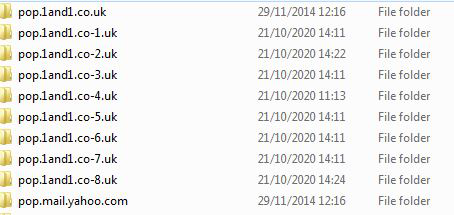
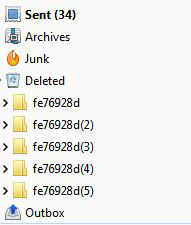
re :I have many pop accounts,
You seem to have several pop accounts in the first image - in the profile name folders, but how many do you have in the 'Folder Pane' or 'Account Settings' window ? It looks like you have a pop account with yahoo server and also another pop account with 1&1 server or several pop accounts with that server.
Do you really have several email addresses/mail accounts with 1&1 server or only the one?
I've also just noticed that the Outbox is being displayed in the same place as other folders which leads me to conclude that you do not see individual POP mail accounts with their own set of folders because they are setup to use a 'Gloabl Inbox' in 'Local Folders'. Is that correct?
If yes:
- Help > Troubleshooting Information
- click on 'Open Folder'
- Exit Thunderbird now.
- click on 'Mail' folder
- click on 'Local Folders'
Make sure you have the 'View' showing details. Please post image showing all the contents of the 'Local Folders' folder prior to deleting anything.
You will see:
   a 'Trash' file with no extension - delete it.
   a 'Trash.msf' file - delete it.
   a 'Trash.sbd' folder - delete it.
Create a new 'Trash' mbox file as before - see previous comment for instructions.
Start Thunderbird.
შერჩეული გადაწყვეტა
The problem appears to have been with AVG Anti virus, see:- https://support.mozilla.org/en-US/questions/1259500 Quote: 'Most people have and need an exclusion in the anti virus product to stop the rot'. Exclusion now made, and files deleted and reinstated as suggested above, all sees to be back to normal. Thanks for your help and interest. Barry