



My Mac and Laptop Are connected to the internet via WiFi... I have promblem loading any Google websites or google search . Page Comes up with Secure Connection Failed
The connection to www.google.com was interrupted while the page was loading.
   The page you are trying to view cannot be shown because the authenticity of the received data could not be verified.
   Please contact the website owners to inform them of this problem.
Please help...I can do all of the above problem with my other mac that is connected to the internet via cable. However all wifi contions are not working...Thank you
გადაწყვეტა შერჩეულია
Fix my problem with Dr web....https://download.drweb.com/demoreq/home/
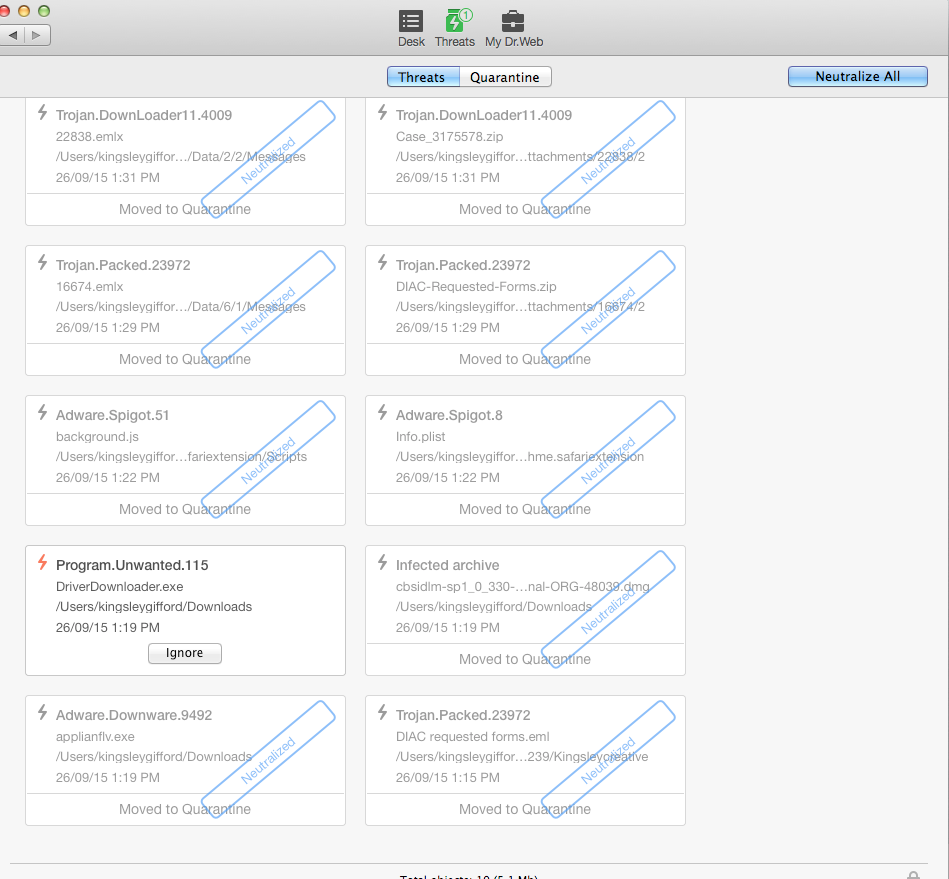
Just downloaded the trial and run scan and got 10 treats and Quarantine them. 4 trojans, infected Archive and Adware.spigot Trojan Down loader 114009 Thanks for your help .No runing great and can get Youtube and google
პასუხის ნახვა სრულად 👍 2ყველა პასუხი (12)
Try disabling Ghostery.
Do i just pause ..Or how do i Disable?
I have disable Ghostry and still have the same problem..
Do you have that problem with this URL?
Yes, and when i search For Google this url comes up
https://www.google.com/search?q=google&ie=utf-8&oe=utf-8
This is weird
Only Seems to be with Google
Google and You tube, Gmail .But no other sites..
HTTP connections with Google and YouTube automatically redirect to HTTPS and that seems to be your problem.
Another Mac user with the same issue? https://support.mozilla.org/en-US/questions/1085426
In Firefox Preferences > Advanced --> General Is Warn me when websites try to redirect or reload the page check-marked?
yes Checked marked..
შერჩეული გადაწყვეტა
Fix my problem with Dr web....https://download.drweb.com/demoreq/home/
Just downloaded the trial and run scan and got 10 treats and Quarantine them. 4 trojans, infected Archive and Adware.spigot Trojan Down loader 114009 Thanks for your help .No runing great and can get Youtube and google
Screen shot added
If you can't inspect the certificate via "I Understand the Risks" then try this:
Open the "Add Security Exception" window by pasting this chrome URL in the Firefox location/address bar and check the certificate:
- chrome://pippki/content/exceptionDialog.xul
In the location field of this window type or paste the URL of the website.
- retrieve the certificate via the "Get certificate" button
- click the "View..." button to inspect the certificate in the Certificate Viewer
You can inspect details like the issuer and the certificate chain in the Details tab of the Certificate Viewer. Check who is the issuer of the certificate. If necessary then you can attach a screenshot that shows the certificate viewer.