


How to save cookies selectively for a few sites?
Hello,
I would like to allow a select set of websites to save cookies. It would be nice if the data for these sites is saved when history is cleared when I close the browser. After browsing a number of help articles, it is not clear to me that Firefox supports the capability.
Am I missing something? Any help to configure my browser to selectively save data (cookies) and clear all other junk is much appreciated.
Thanks in advance for all your help.
Regards, Raghu
選ばれた解決策
すべての返信 (3)
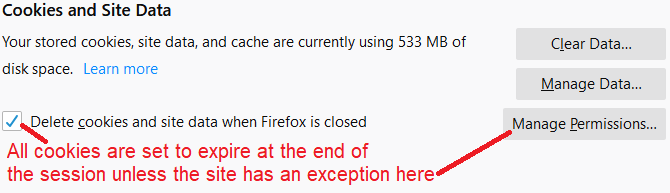
If you use "Delete cookies and site data when Firefox is closed" to remove cookies then you keep cookies that have an allow exception. You can only create an allow exception for a specific domain. If you need finer control then you need a cookie manager extension, you can search the Add-ons website.
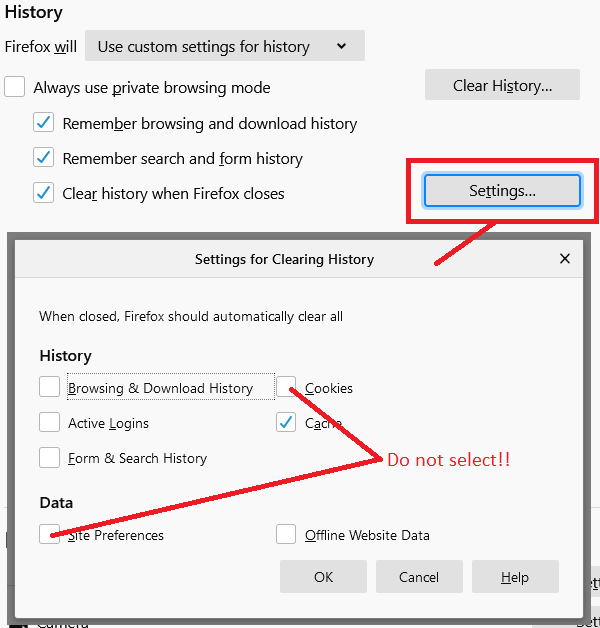
If you otherwise clear cookies like via "Clear history when Firefox closes" then all cookies are removed including cookies with an allow exception.
選ばれた解決策
If you are a visually oriented person:
Yes:
<center> </center>
No:
<center> </center>
Thank you cor-el and jscher2000! Your help is greatly appreciated.