


Windows 10 reached EOS (end of support) on October 14, 2025. If you are on Windows 10, see this article.

Search Support

Avoid support scams. We will never ask you to call or text a phone number or share personal information. Please report suspicious activity using the “Report Abuse” option.

Learn More

Any way to customize quick-access / dot menu or relocate Share icon to be more accessible?

  • Nzaghachi adịghị
  • 0

Many of the changes in the newest Firefox for mobile are an improvement, but one thing that really isn't is the location of the share button. I use this feature more than any other.

It used to be that I could press and hold to select the tabs I wished to share and the share button would pop right up. Now, the menu contains a bookmark icon (star) and a bin. Meanwhile the share button is hidden under the dot menu, even though there's more than enough room for it in the header bar, even with the star and bin.

If there is currently no way to customize the quick-access icons, I encourage developers to consider making the share button more prevalent or allowing users to customize quick access, in future.
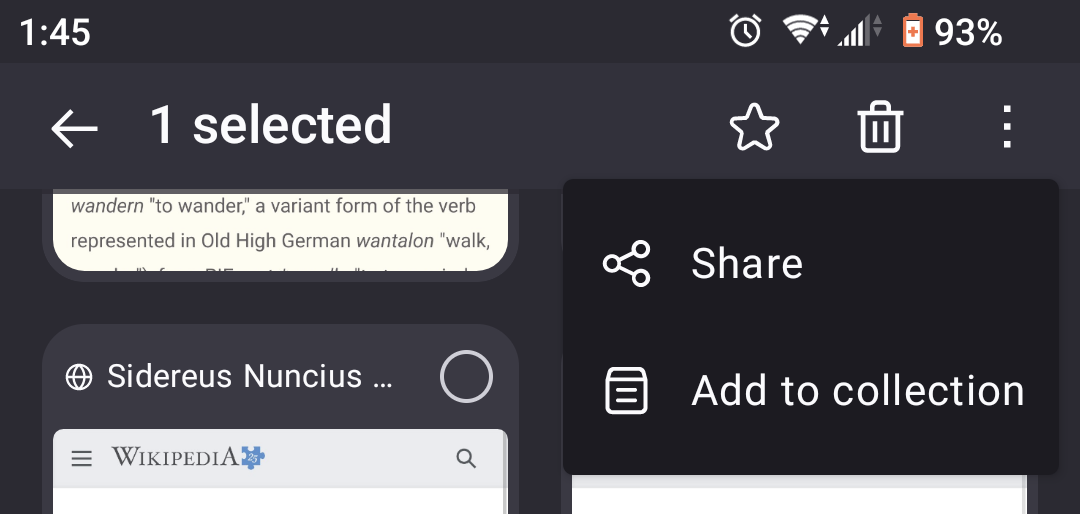
Many of the changes in the newest Firefox for mobile are an improvement, but one thing that really isn't is the location of the share button. I use this feature more than any other. It used to be that I could press and hold to select the tabs I wished to share and the share button would pop right up. Now, the menu contains a bookmark icon (star) and a bin. Meanwhile the share button is hidden under the dot menu, even though there's more than enough room for it in the header bar, even with the star and bin. If there is currently no way to customize the quick-access icons, I encourage developers to consider making the share button more prevalent or allowing users to customize quick access, in future.
Nseta ihuenyo ndị agbakwunyere

Edeziri site na wynden

You must log in to your account to reply to posts. Please start a new question, if you do not have an account yet.