


Windows 10 reached EOS (end of support) on October 14, 2025. If you are on Windows 10, see this article.

Támogatás keresése

Kerülje el a támogatási csalásokat. Sosem kérjük arra, hogy hívjon fel egy telefonszámot vagy osszon meg személyes információkat. Jelentse a gyanús tevékenységeket a „Visszaélés bejelentése” lehetőséggel.

További tudnivalók

Unable to re-install Gmail account

  • 2 válasz
  • 0 embernek van ilyen problémája
  • 269 megtekintés
  • Utolsó üzenet ettől: christ1
  • Zárolt

Hi Thunderbird, At the weekend we accidentally completely deleted some Gmail emails from Apple Mail . These were also deleted from Thunderbird (2 Gmail accounts) on our PC. We recovered the emails, in the process having to change my Google Password. Whilst the deleted emails returned, one Thunderbird Gmail account was not receiving new incoming emails. (one account is) The emails are arriving as normal into Gmail. After various unsuccessful attempts to to connect to the server I deleted the defective Gmail account from Thunderbird, using the Red Button in account settings, hoping to then be able to reinstall it as a new account. When I attempt to reinstall the now "deleted" account I get the yellow "Unable to log in at Server" message. . The password I am using to add the account is the same as the one I use to sign into that account on Gmail (set on Monday), but it does not seem to be working on TB. I tried the trick of not putting in the password when setting up the new account but this did not work either. I am using TB 140.6.0esr Any suggestion please John
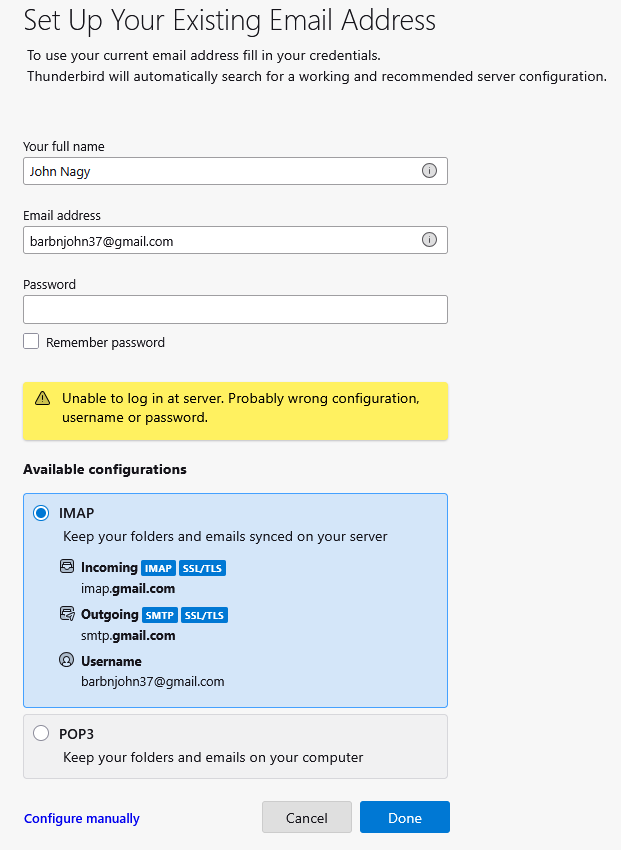
Hi Thunderbird, At the weekend we accidentally completely deleted some Gmail emails from Apple Mail . These were also deleted from Thunderbird (2 Gmail accounts) on our PC. We recovered the emails, in the process having to change my Google Password. Whilst the deleted emails returned, one Thunderbird Gmail account was not receiving new incoming emails. (one account is) The emails are arriving as normal into Gmail. After various unsuccessful attempts to to connect to the server I deleted the defective Gmail account from Thunderbird, using the Red Button in account settings, hoping to then be able to reinstall it as a new account. When I attempt to reinstall the now "deleted" account I get the yellow "Unable to log in at Server" message. . The password I am using to add the account is the same as the one I use to sign into that account on Gmail (set on Monday), but it does not seem to be working on TB. I tried the trick of not putting in the password when setting up the new account but this did not work either. I am using TB 140.6.0esr Any suggestion please John
Csatolt képernyőmentések

Összes válasz (2)

OOPS The screenshot shown here is using the incorrect Google Account name. I have raised a new Query today showing the correct Google Account Name, which when used did not work either.