Exceptions reset after Firefox update

Firefox removes the exceptions after every update and they have to be manually re-added. This is a very frustrating user experience. Can you please help me identify if this is an issue with Firefox that can be updated or is it an issue with some setting I have setup.
Exceptions that get reset - Cookies and Site Data, Pop-ups, Add-ons, etc.
Permissions that get reset - All of them Location, Camera, Microphone, etc.
- Side note, the Troubleshooting Information section below has a link to share data, that link does not open in a new window. It opened in this same window, erasing all the content I had typed up the first time.
Kiválasztott megoldás
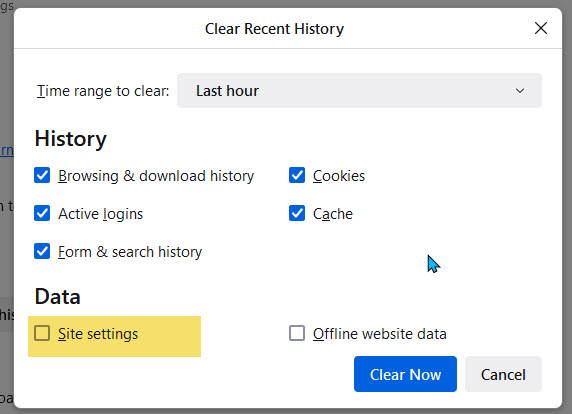
Those exceptions are stored in permissions.sqlite and are part of the "Site settings", so it sounds like you lose the "Site settings".
- clearing "Site settings" clears exceptions for cookies, images, pop-up windows, and software installation and exceptions for passwords and other website specific data
Összes válasz (3)
Kiválasztott megoldás
Those exceptions are stored in permissions.sqlite and are part of the "Site settings", so it sounds like you lose the "Site settings".
- clearing "Site settings" clears exceptions for cookies, images, pop-up windows, and software installation and exceptions for passwords and other website specific data
Sorry to hear about the Share Data data loss. Users report this from time to time but it is inconsistent, which makes it hard to identify what causes it.
Does Firefox remember your browsing history properly, the only thing you lose is Exceptions/Permissions?
It does not remember browsing history, but I did have that setting chosen in the clear history upon closing. I believe the other comment was correct. I unchecked the "Site settings" under data to clear when I close the browser and will wait for the next update to see if that fixed the issue. User error :)