


Windows 10 reached EOS (end of support) on October 14, 2025. For more information, see this article.

Támogatás keresése

Kerülje el a támogatási csalásokat. Sosem kérjük arra, hogy hívjon fel egy telefonszámot vagy osszon meg személyes információkat. Jelentse a gyanús tevékenységeket a „Visszaélés bejelentése” lehetőséggel.

További tudnivalók

A témacsoportot lezárták és archiválták. Tegyen fel új kérdést, ha segítségre van szüksége.

Some .MSI Files Downloaded as Garbled Plain/Text in Firefox v106.0.x

  • 2 válasz
  • 1 embernek van ilyen problémája
  • 190 megtekintés
  • Utolsó üzenet ettől: lmacri

I am trying to download a .msi installer from the Dell servers at https://dl.dell.com/serviceability/catalog/SupportAssistx64-3.12.3.5.msi using Firefox v106.0.1 but when I click on that link it opens in a new tab as garbled plain/text (see attached image). If I right click that link and choose "Save Link As" then I am able to correctly download the .msi file.

I have no problem downloading this .msi installer using MS Edge v106.0.1370.52.

I don't think there is a universal problem downloading all .msi installers with Firefox since I can download the latest 64-bit .msi installer for Firefox (Firefox Setup 106.0.1.msi) from https://www.mozilla.org/en-US/firefox/all/ without a problem.

I found a comment by jsche2000 in rkm's July 2017 thread clicking on msi link displays garbage rather than download msi file that "usually the problem is that the server is not set up with a specific content-type for .msi so it sends a default content type such as text/html or text/plain that Firefox dutifully displays in a tab... Unfortunately, there's no built-in way to tell Firefox 'when you see a .msi extension, ignore the content-type indicated by the server and just save it' ".

Before I contact Dell and ask them to fix this problem on their download server, is there any possibility that Firefox v106.0.x has introduced a bug in the way this browser recognizes the specific content-type of some .msi installers? I'm not sure, but there seems to be a change in way that Firefox downloads files in v106.0.x. For example, when I download the latest 64-bit .msi installer for Firefox from https://www.mozilla.org/en-US/firefox/all/ my Firefox prompt now specifically declares that I'm downloading a Windows Installer Package (see attached image), which I don't recall seeing with previous versions of Firefox.

-----------

64-bit Win 10 Pro v21H2 build 19044.2130 * Firefox v106.0.1 * Microsoft Defender v4.18.2209.7-1.1.19700.3 * Malwarebytes Premium v4.5.16.217-1.0.1792 * Macrium Reflect Free v8.0.6979 * Dell SupportAssist v3.12.3.5 * Dell Update Windows Universal v4.6.0 Dell Inspiron 15 5584, Intel i5-8265U CPU, 8 GB RAM, 256 GB Toshiba KBG40ZNS256G NVMe SSD, Intel UHD Graphics 620
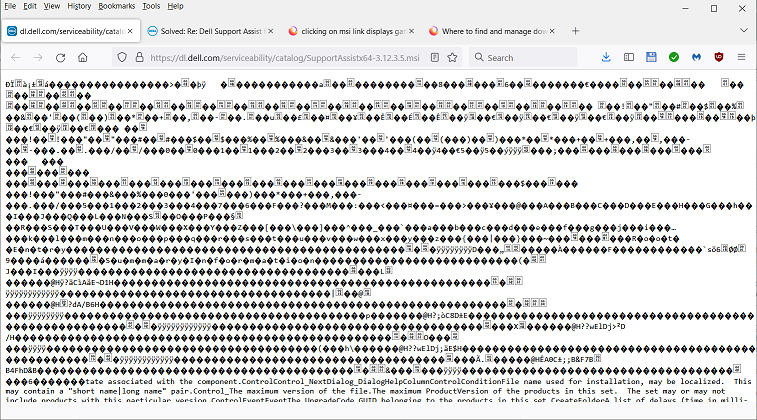
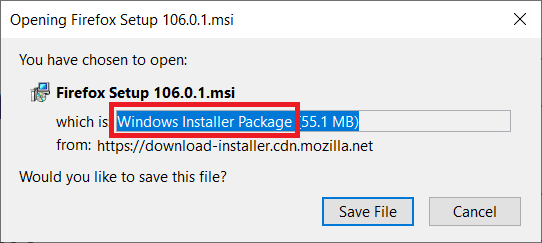
I am trying to download a .msi installer from the Dell servers at [https://dl.dell.com/serviceability/catalog/SupportAssistx64-3.12.3.5.msi https://dl.dell.com/serviceability/catalog/SupportAssistx64-3.12.3.5.msi] using Firefox v106.0.1 but when I click on that link it opens in a new tab as garbled plain/text (see attached image). If I right click that link and choose "Save Link As" then I am able to correctly download the .msi file. I have no problem downloading this .msi installer using MS Edge v106.0.1370.52. I don't think there is a universal problem downloading all .msi installers with Firefox since I can download the latest 64-bit .msi installer for Firefox (Firefox Setup 106.0.1.msi) from [https://www.mozilla.org/en-US/firefox/all/ https://www.mozilla.org/en-US/firefox/all/] without a problem. I found a comment by jsche2000 in rkm's July 2017 thread [https://support.mozilla.org/en-US/questions/1169672#answer-992072 clicking on msi link displays garbage rather than download msi file] that "''usually the problem is that the server is not set up with a specific content-type for .msi so it sends a default content type such as text/html or text/plain that Firefox dutifully displays in a tab... Unfortunately, there's no built-in way to tell Firefox 'when you see a .msi extension, ignore the content-type indicated by the server and just save it''' ". Before I contact Dell and ask them to fix this problem on their download server, is there any possibility that Firefox v106.0.x has introduced a bug in the way this browser recognizes the specific content-type of some .msi installers? I'm not sure, but there seems to be a change in way that Firefox downloads files in v106.0.x. For example, when I download the latest 64-bit .msi installer for Firefox from [https://www.mozilla.org/en-US/firefox/all/ https://www.mozilla.org/en-US/firefox/all/] my Firefox prompt now specifically declares that I'm downloading a Windows Installer Package (see attached image), which I don't recall seeing with previous versions of Firefox. ----------- 64-bit Win 10 Pro v21H2 build 19044.2130 * Firefox v106.0.1 * Microsoft Defender v4.18.2209.7-1.1.19700.3 * Malwarebytes Premium v4.5.16.217-1.0.1792 * Macrium Reflect Free v8.0.6979 * Dell SupportAssist v3.12.3.5 * Dell Update Windows Universal v4.6.0 Dell Inspiron 15 5584, Intel i5-8265U CPU, 8 GB RAM, 256 GB Toshiba KBG40ZNS256G NVMe SSD, Intel UHD Graphics 620
Csatolt képernyőmentések

Kiválasztott megoldás

Yes, the wrong file type is configured on that server. It's text/plain instead of binary.

It's better to contact Dell, but as a workaround you can try out this extension: https://addons.mozilla.org/firefox/addon/content-type-fixer/

Válasz olvasása eredeti szövegkörnyezetben 👍 1

Összes válasz (2)

Kiválasztott megoldás

Yes, the wrong file type is configured on that server. It's text/plain instead of binary.

It's better to contact Dell, but as a workaround you can try out this extension: https://addons.mozilla.org/firefox/addon/content-type-fixer/

Hi TyDrainu:

Thank you for your prompt response. I've contacted Dell and asked them to fix the MIME type of that file on their web server.