


Firefox drop-down menu (from menu bar) wrongly size on scaled diplay
My windows 10 laptop setup is an external 1920x1080 at 100% zoom and the laptop screen set-up as secondary, at 2560x1440 scaled at 150%.
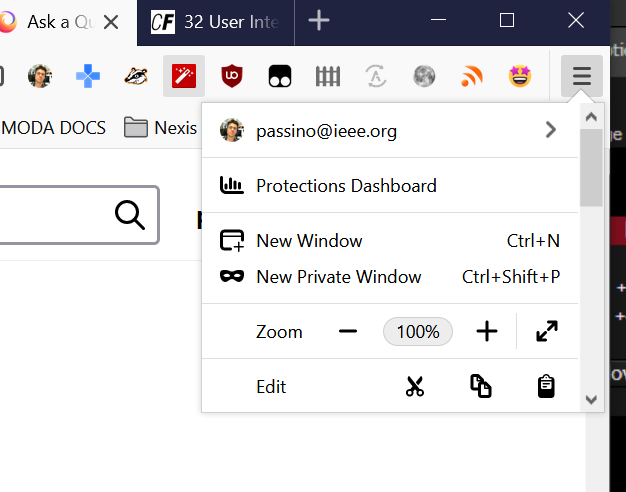
Firefox (79.0 (64-bit)) works fine on the primary (unscaled) display, but on the scaled display all the drop-down menus (extension, but also hamburger from firefox) are too small, and the contents are either not entirely visible (typically for the extensions) or need a scrollbar (like the main firefox menu).
I tried to run firefox with extensions disabled but the problem persists.
I think this is a Firefox bug. Is it true and if so, how do I report it?
My windows 10 laptop setup is an external 1920x1080 at 100% zoom and the laptop screen set-up as secondary, at 2560x1440 scaled at 150%.
Firefox (79.0 (64-bit)) works fine on the primary (unscaled) display, but on the scaled display all the drop-down menus (extension, but also hamburger from firefox) are too small, and the contents are either not entirely visible (typically for the extensions) or need a scrollbar (like the main firefox menu).
I tried to run firefox with extensions disabled but the problem persists.
I think this is a Firefox bug. Is it true and if so, how do I report it?
Összes válasz (2)
Hi, you can file a bug on https://bugzilla.mozilla.org/enter_bug.cgi