


When firefox shows security indicator in a page whitout login form?

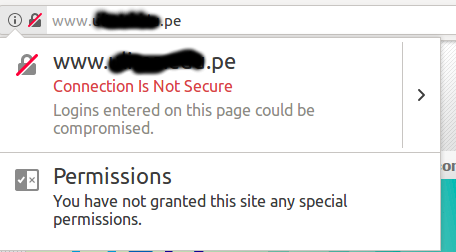
In a website, in the front-page, I have the firefox security indicator (image is attached).
I was reading the documentation to figure out what is happening. The documentation says this indicator is showing "when a login page you’re viewing does not have a secure connection". In this page we don't have a login form. We don't have either an input of type "password".
Why Firefox is showing this message?
Thanks
Összes válasz (3)
Here is the image.
Kiválasztott megoldás
Firefox always shows this warning message by default when you are on an open HTTP connection and shows with a padlock with a strike through and "Connection is Not Secure" if you click the Control Center 'i' button at the left end of the location/address bar.
You can disable the warning that opens when you type in a name/password field by setting this pref to false.
- security.insecure_field_warning.contextual.enabled = false
You can remove the warning in the location bar by setting this pref to false on the about:config page.
- security.insecure_password.ui.enabled = false
See also:
As I understand the problem could be that the connection remains open, for some reason. Thank you.