


Windows 10 reached EOS (end of support) on October 14, 2025. If you are on Windows 10, see this article.

Támogatás keresése

Kerülje el a támogatási csalásokat. Sosem kérjük arra, hogy hívjon fel egy telefonszámot vagy osszon meg személyes információkat. Jelentse a gyanús tevékenységeket a „Visszaélés bejelentése” lehetőséggel.

További tudnivalók

A témacsoportot lezárták és archiválták. Tegyen fel új kérdést, ha segítségre van szüksége.

Firefox quantum has bad multi monitor support.

  • 1 válasz
  • 13 embernek van ilyen problémája
  • 189 megtekintés
  • Utolsó üzenet ettől: dusty071
  • Megoldva

I have two screens, set up in Windows 10 like this: - Main monitor is 3840 x 2160 , DPI scaling 175% - Second monitor is 1680 x 1050, DPI scaling 100%

I cannot use Firefox on both screens because it does not switch the value of "layout.css.devPixelsPerPx" automatically between 1.75 and 1.00, making some addons unusable and text unreadable due to size distortion.

Another problem is that when on the second screen the Firefox top most section (the tab bar and min/max/close buttons) never fully maximizes to the top of the monitor no matter what i try. From first glance it seems that the topmost 3 pixels are empty, i cannot click a tab or a min/max/close button in the top most 3 pixels, i can only use them for dragging the firefox window. Weirdly the window does work properly when in the Full-screen mode.

I love firefox and i would like to continue using it but i hope there is eventually a solution to these problems, thanks.

I have two screens, set up in Windows 10 like this: - Main monitor is 3840 x 2160 , DPI scaling 175% - Second monitor is 1680 x 1050, DPI scaling 100% I cannot use Firefox on both screens because it does not switch the value of "layout.css.devPixelsPerPx" automatically between 1.75 and 1.00, making some addons unusable and text unreadable due to size distortion. Another problem is that when on the second screen the Firefox top most section (the tab bar and min/max/close buttons) never fully maximizes to the top of the monitor no matter what i try. From first glance it seems that the topmost 3 pixels are empty, i cannot click a tab or a min/max/close button in the top most 3 pixels, i can only use them for dragging the firefox window. Weirdly the window does work properly when in the Full-screen mode. I love firefox and i would like to continue using it but i hope there is eventually a solution to these problems, thanks.

Kiválasztott megoldás

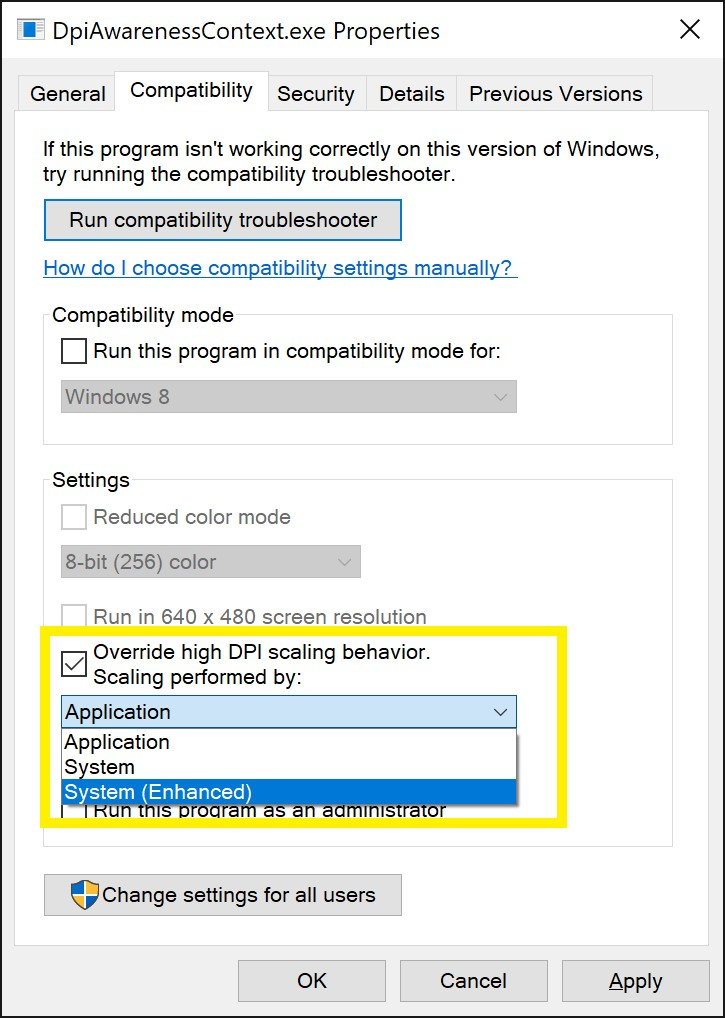
I think setting the scaling to System (enhanced) fixed both of my issues.
Válasz olvasása eredeti szövegkörnyezetben 👍 4

Összes válasz (1)

Kiválasztott megoldás

I think setting the scaling to System (enhanced) fixed both of my issues.