


FF (Latest version - now) and VideoDownload Helper, not working. March 2016

I am sorry folks if this is a "repeat" question. Looking on google, it has been mentioned, but that was a LONG TIME AGO.
Today is 24 March 2016.
Less than a week ago, I could to go youtube sites and download clips. It would pop up a list of all the different formats, and I selected the one I wanted.
The file downloaded and I was happy.
When I booted up today Flash Player needed an update. I did that.
Dunno what happened but today, MAYBE yesterday, things all went south.
Today I was wanting to download some more clips as I am doing a course and there are heaps of clips which help with the topic. Gotta love computers.
When I initially tried today, I was shown ONE file and it was .webm No .mp4 or other stuff.
Exited and restarted. Didn't work. Updated all the add ons, and updated FF from 44.x to 45.x Restarted, didn't work.
Searched google and people were mentioning version 36.x..... Yeah, kinda dated.
Now I have the latest version of FF but "rolled back" VDL to 5.5.0a11. I had the latest and it didn't work, so the old posts suggested to go back to an earlier version. Thought I would give it a try.
Na.
The other times, the list of possible downloads shows the name with the available formats. Now all I see is a file: YOUTUBE 1.1 mb -webm
I can't really find a base line where/when things went wrong.
Összes válasz (2)
Hi folks,
Update from me.
Out of desperation, I did a bit of digging.
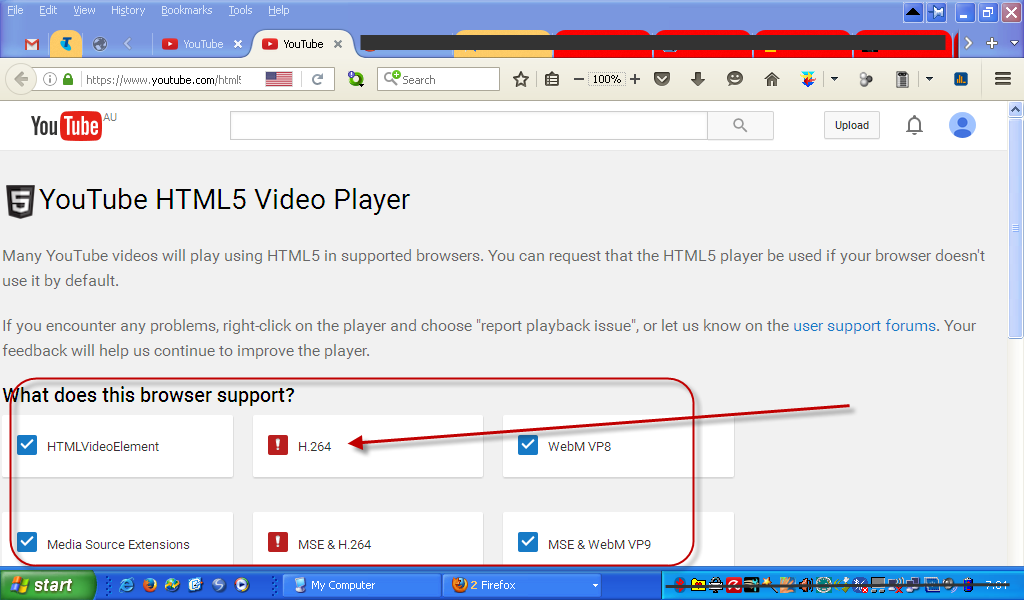
I found this bit of information: https://www.youtube.com/html5
Honestly, I don't understand all the mumbo jumbo, but I usually get .mp4 clips.
If these settings have any control of that, I think this may be partly the cause.
Just to also reduce any ambiguity, I have included a screen grab.
Good evening,
what is your operating system? What is the version of the Windows? The problem occurs in Flash Player? What is the version of the Flash Player? There remains the problem? Thank you for understand.
Best regards, David-Walczysko Volunteer supporter