


I am running on Windows 7 and my close tabs are blacked out??

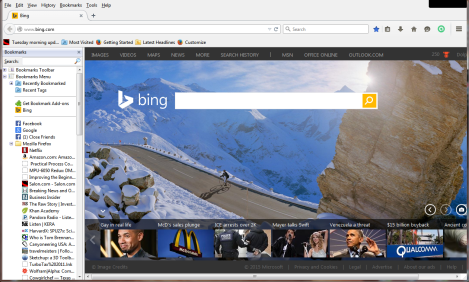
The tab in the upper right-hand corner of the page is blacked out. This is the tab to close Firefox. When I click in the black box where the close button should be; it closes.
Kiválasztott megoldás
Start Firefox in Safe Mode to check if one of the extensions (Firefox/Tools > Add-ons > Extensions) or if hardware acceleration is causing the problem.
- Switch to the DEFAULT theme: Firefox/Tools > Add-ons > Appearance
- Do NOT click the Reset button on the Safe Mode start window
- https://support.mozilla.org/kb/Safe+Mode
- https://support.mozilla.org/kb/Troubleshooting+extensions+and+themes
If you use a non standard windows theme or made other appearance changes then try to revert those and use a (different) standard theme.
- Control Panel > Personalization > Theme & Window Color and Appearance
Összes válasz (7)
Are you using any complete theme?
I'm running the default theme.
can you post a screenshot showing the issue?
Note black rectangle in upper right-hand corner.
Kiválasztott megoldás
Start Firefox in Safe Mode to check if one of the extensions (Firefox/Tools > Add-ons > Extensions) or if hardware acceleration is causing the problem.
- Switch to the DEFAULT theme: Firefox/Tools > Add-ons > Appearance
- Do NOT click the Reset button on the Safe Mode start window
- https://support.mozilla.org/kb/Safe+Mode
- https://support.mozilla.org/kb/Troubleshooting+extensions+and+themes
If you use a non standard windows theme or made other appearance changes then try to revert those and use a (different) standard theme.
- Control Panel > Personalization > Theme & Window Color and Appearance
Changing the Windows wallpaper photo cleared the problem.
Thanks
I'm also having the same issue. Seems Firefox will not come out of safe mode.. I've tried all solutions above. Also running win 7.