


Windows 10 reached EOS (end of support) on October 14, 2025. If you are on Windows 10, see this article.

Pretraži podršku

Izbjegni prevare podrške. Nikad te nećemo tražiti da nas nazoveš, da nam pošalješ telefonski broj ili da podijeliš osobne podatke. Prijavi sumnjive radnje pomoću opcije „Prijavi zlouporabu”.

Saznaj više

Firefox 115.12.0ser for Mac: YouTube video page items transposed

  • 1 odgovor
  • 0 ima ovaj problem
  • 139 prikaza
  • Posljednji odgovor od Seele

I am using an older MacBook Pro running Mojave 10.14.6, for which the latest Firefox is 115.12.0ser (64-bit). It has always been working like a champ, but a few weeks ago, individual YouTube video pages look very odd. Usually the related recommended videos are along the right edge in one row, and below the default video window is the title, description, and then the comments.

The problem I have is that these two components became transposed, and if the video is displayed as full screen, the page can be pushed upwards to show the title etc got squashed below the video window, with the recommended videos still in a grid below it. I hope the included pictures are sufficient to illustrate the issue.

Another computer, an iMac running El Capitan 10.11.6, and Firefox 78.15.0ser owned by a family member, does not show this odd phenomenon. I must say I am quite intrigued by this, and would greatly appreciate any help my fellow members can offer.
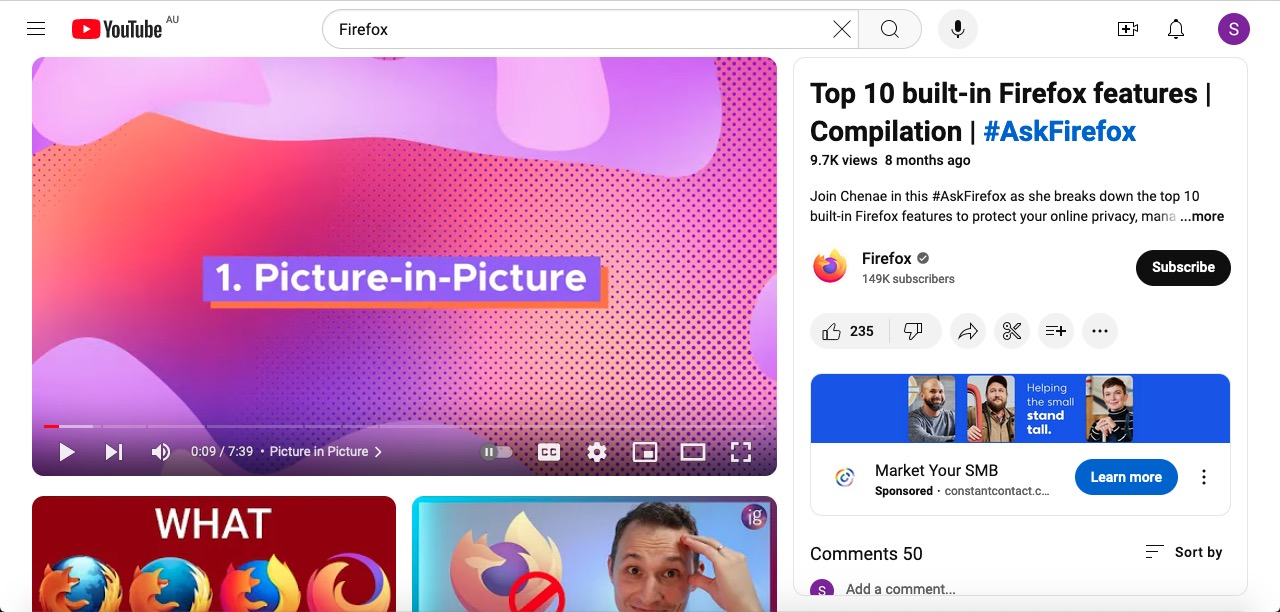

I am using an older MacBook Pro running Mojave 10.14.6, for which the latest Firefox is 115.12.0ser (64-bit). It has always been working like a champ, but a few weeks ago, individual YouTube video pages look very odd. Usually the related recommended videos are along the right edge in one row, and below the default video window is the title, description, and then the comments. The problem I have is that these two components became transposed, and if the video is displayed as full screen, the page can be pushed upwards to show the title etc got squashed below the video window, with the recommended videos still in a grid below it. I hope the included pictures are sufficient to illustrate the issue. Another computer, an iMac running El Capitan 10.11.6, and Firefox 78.15.0ser owned by a family member, does not show this odd phenomenon. I must say I am quite intrigued by this, and would greatly appreciate any help my fellow members can offer.
Priložene slike ekrana

Izabrano rješenje

Somehow it fixed itself yesterday, perhaps it's YouTube's codes that caused the issue.

Pročitaj ovaj odgovor u kontekstu 👍 0

Svi odgovori (1)

Odabrano rješenje

Somehow it fixed itself yesterday, perhaps it's YouTube's codes that caused the issue.