פתוחה
Uninstall not found... TB trying to reset to default
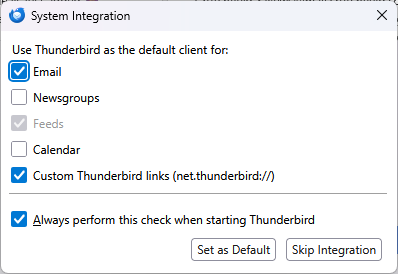
Over the last couple of weeks, TB comes up with a message "System Integration Use Thunderbird as the default client for:" with "Email", "Custom Thunderbird links (net.thunderbird)" and "Always perform this check when starting Thunderbird" options checked.
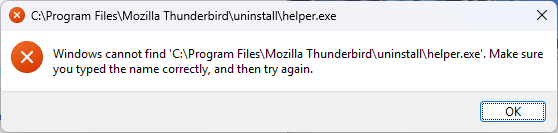
I check set as default and get "C:\Program Files\Mozilla Thunderbird\uninstall\helper.exe'" and "Windows cannot find 'C:\Program Files\Mozilla Thunderbird\uninstall\helper.exe'. Make sure you typed the name correctly, and then try again." (screen shots attached)
As you can see, I was just accepting the settings. not sure why it's looking for helper or to uninstall? Sorry, can't find the app menu in TB with instructions provided in the line.
Thanks!
Over the last couple of weeks, TB comes up with a message "System Integration Use Thunderbird as the default client for:" with "Email", "Custom Thunderbird links (net.thunderbird)" and "Always perform this check when starting Thunderbird" options checked.
I check set as default and get
"C:\Program Files\Mozilla Thunderbird\uninstall\helper.exe'" and "Windows cannot find 'C:\Program Files\Mozilla Thunderbird\uninstall\helper.exe'. Make sure you typed the name correctly, and then try again."
(screen shots attached)
As you can see, I was just accepting the settings. not sure why it's looking for helper or to uninstall? Sorry, can't find the app menu in TB with instructions provided in the line.
Thanks!