


Unable To Print In Black And White From Firefox

As it says in the title. I recently switched to Firefox, but now, every time I try to print from the browser, it forces the selection to be color printing instead of B/W.
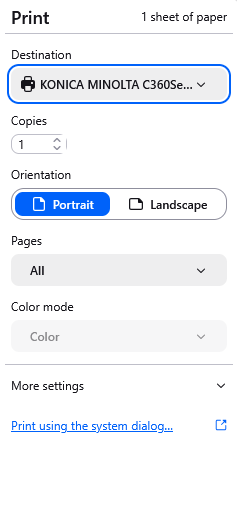
- In the Firefox dialog, the option to change the setting is greyed out (see attached image).
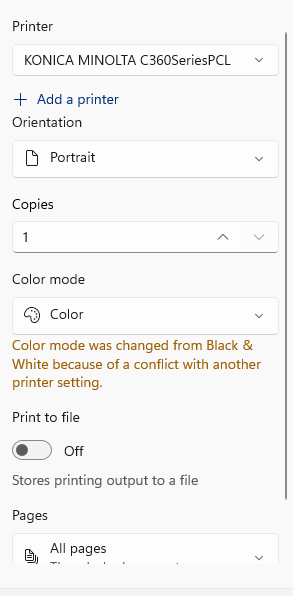
- Switching to the system dialog (with either about:config or with the clickable link in the Firefox dialog) does NOT help-- I can change the setting, but hitting the "print" button causes the setting to revert and display an error message (see attached image).
- I have tried updating the drivers for the associated printer, both through an update and completely disconnecting/reconnecting the printer, but the issue did NOT resolve.
- Chrome and Edge both print black and white to this same printer without issue. The printer has enough black ink. This definitely seems to be a Firefox issue, not a printer one.
Some threads discuss resolving a similar issue with the use of print.cups.monochrome.extra_settings, but I can't seem to find the relevant printer information to make this work. I do need to be able to switch between color and B/W printing frequently, so locking the printer to B/W only isn't a viable option.
If anyone has any insight about this, it would be greatly appreciated!
All Replies (2)

So from your first screenshot it looks like you will have to modify your printer settings.
Do you have any insight into which printer settings need to be modified, and how they can be accessed?
This is not an issue that occurs with any other browser or application. Does the Firefox-opened system dialog have its own specific settings that can be configured somewhere?
Thank you!