


After the lastest update all of the folders I've created and emails within them are missing

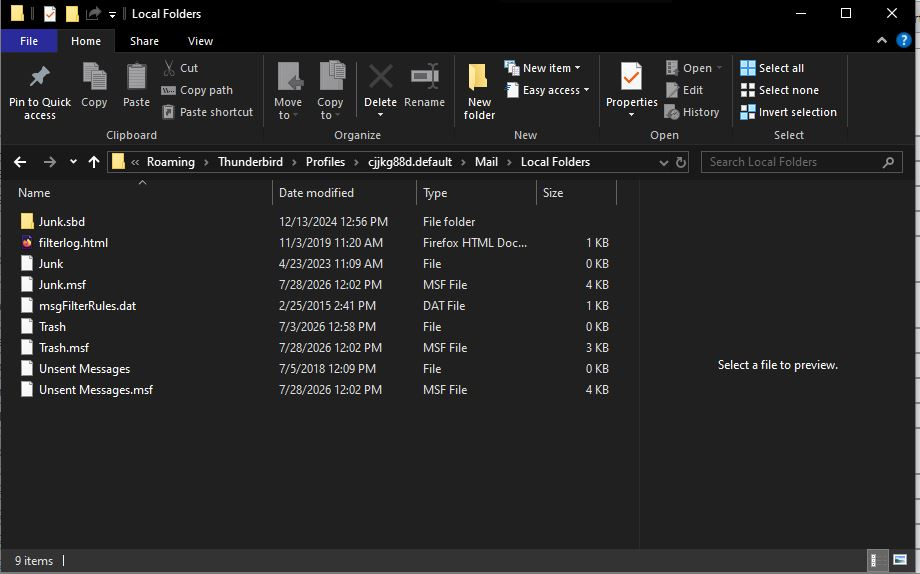
Thunderbird just updated and the next time I opened it all of the folders I created and the emails I'm storing within them are missing. I found my profile as directed. I'm not sure if I have a backup of it. I've included the screenshot as you ask for. I know that those folders and emails are there as I was playing around with the the 3 lines > View and when I moved between the different choices I saw my folders/emails are all in there.
Any assistance you can provide is appreciated!
Réiteach Roghnaithe
Mapenzi
I think I can go as far as this point to find some of my missing emails. I was going to try to use that add-in but FireFox would not let me add it. But I'm OK now. There were a few missing emails but when I look at it all I only lost a few emails and found another folder that had the most important ones for me. So I'm OK.
So my fix happened a few messages back and was this in summary: If you click on the "twisty" (toggle) symbol to expand your Inbox folder like this ∨ Inbox you'll see all your "missing" subfolders in the folder pane. That's because I made all of my subfolders off of my INBOX
I really appreciate all of your time and attention to trying to help me....and fixing my issue! Thanks so much!
All Replies (38)
FWIW,
I've seen other troubleshooting where these screens were requested so I thought I'd be proactive and post the screenshots of them for you.
Here's my: Mail folder Email Folder
Does this help.
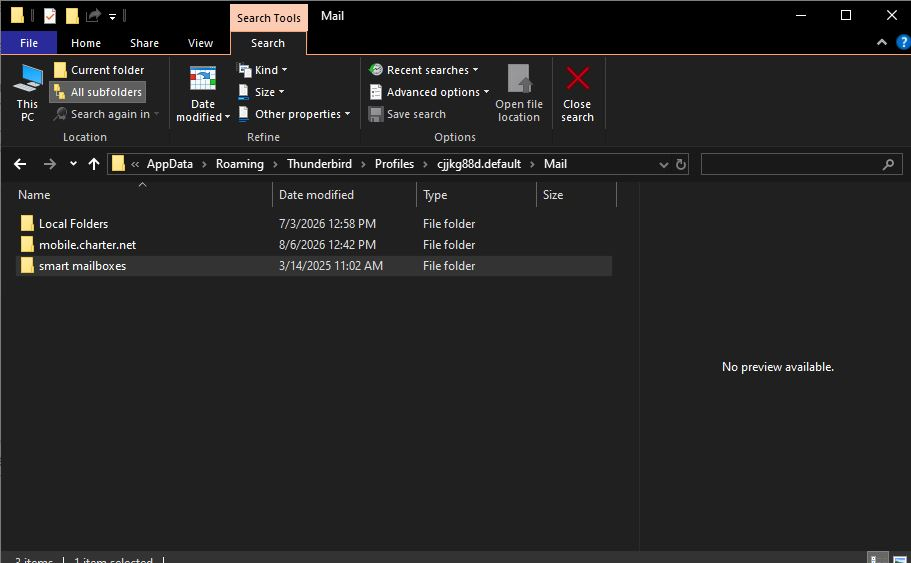
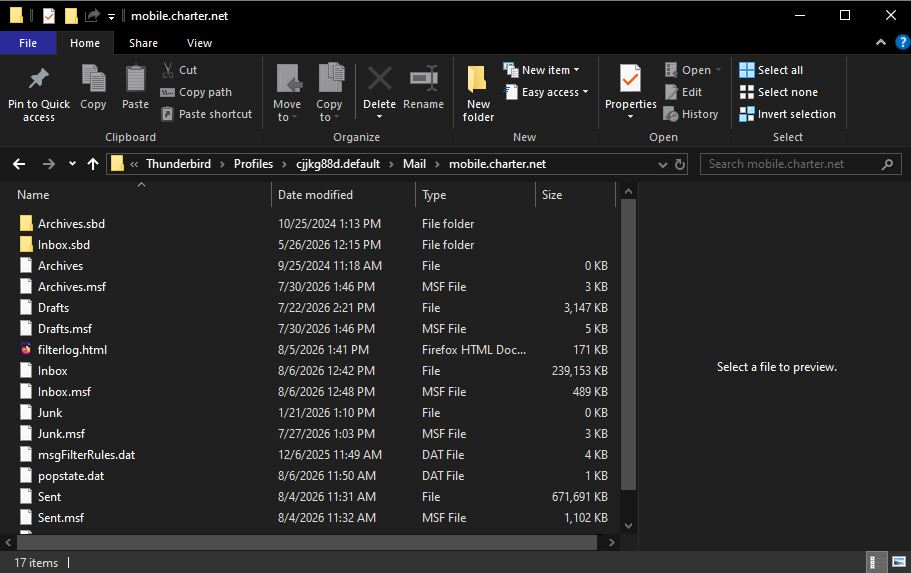
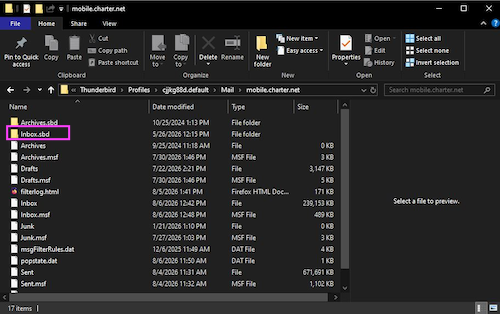
Thank you for the new screen shots. As a matter of fact they are conclusive since one of them shows the contents of your "mobile.charter.net" POP account. And in this account folder I can see an "Inbox.sbd" folder together with the "Inbox" mailbox file. This "Inbox.sbd" folder contains all the mailbox files of the subfolders you created).
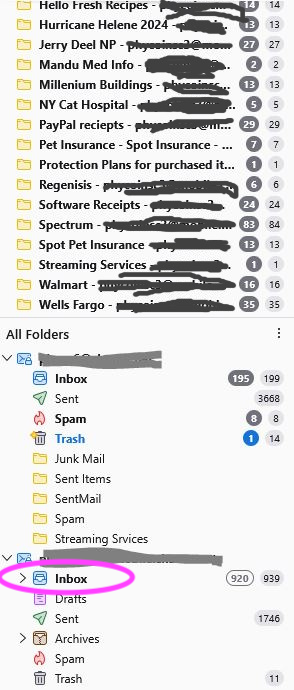
My guess is that you created all those "missing" folders in your POP account as subfolders of your Inbox folder! And now I've also seen one more hint in one of your earlier screen shots where the Inbox folder is collapsed like this: > Inbox (see attached modified image) If you click on the "twisty" (toggle) symbol to expand your Inbox folder like this ∨ Inbox you'll see all your "missing" subfolders in the folder pane.
Athraithe ag Mapenzi ar
Mapenzi,
You are a genius and I'm an idiot!
Thank you so much for finding where my folders were and how I could get my folders back. I feel like a real idiot.
BTW, I went into my Settings and it was setup for IMAP email, not POP so I really don't know what is going on. Just saying. But I'll be happy with POP cuz it works.
I still have another question for you.
When I was getting very frustrated earlier and decided to move my folders that I that I could see in UNREAD & COMPACT views, eachfolder was named as follows with these long names: FOLDER NAME / EMAIL ADDRESS 2 / # UNREAD MESSAGES # TOTAL MESSAGES So in my impatience I moved about 3 of my folders up to the position I wanted them to be in (above it) and as soon as they were away from their COMPACT VIEW line of text with that long folder name the mail inside of these folders just disappeared. Nowhere to be found. And they sit empty now that I have found my folders. So my question is, is there a way to find those missing emails in those folders?
One problem solved for the benefit of a new one! Your folder names are really long which leads to very long paths. I think on Windows there is a limit of 256 signs; I have always wondered about users' inventiveness when creating long folder names.
Now first R-click on one of those empty folders > Properties: which is the number of messages and which is the size on disk? At the same time you can try a click on 'Repair Folder' and report the result.
If "Repair" doesn't work I need a new screen shot of the contents of the Inbox.sbd folder in the mobile.charter.net folder in Mail in your profile folder (see image) go back to your profile folder via Help > Troubleshooting Information > Profile Folder > Open Folder, then exit Thunderbird. Open the folder Mail > then mobile.charter.net > and open Inbox.sbd: Take a screen shot of its contents, the file sizes should be visible in the image.
Athraithe ag Mapenzi ar
Thank you again Mapenzi!
OK, I need to clear something up. I do not have long folder names. The ones I give my folders are a good size. However, when I looked at my screen in COMPACT VIEW I got the view of my folders for the first time and In this view the folders get an addition that gives it's email address it's assigned to and the quantity of unread messages it has within and the total messages it has within So Food Recipes Looked like this: Food Recipes / Email Address 1 / Quantity of Unread messes in it and Total Quantity of messages in it I hope that helps make ma not look like an idiot who makes very long folder names.
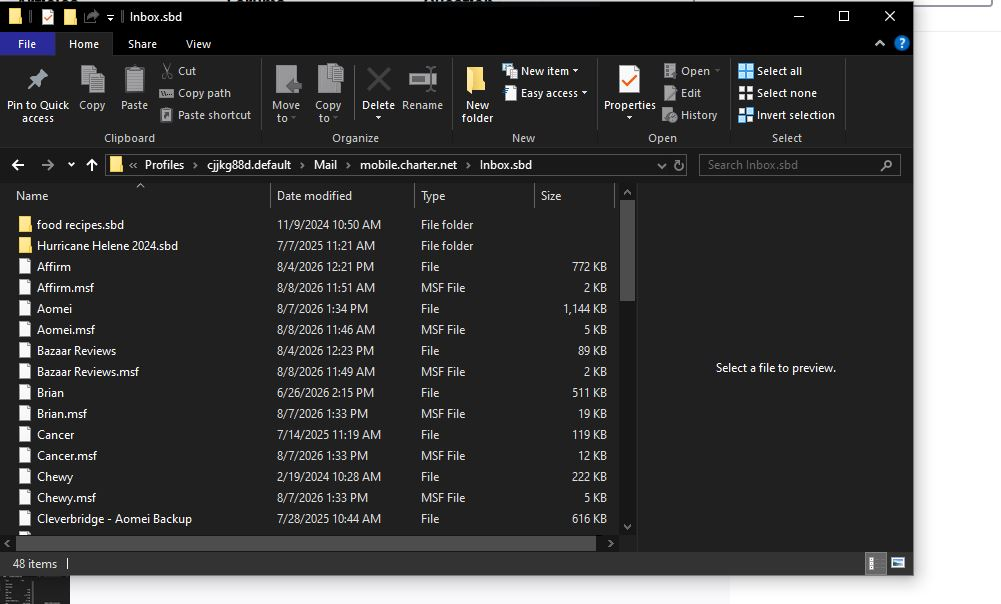
And I just followed your instructions above and now I see a list of all of my folders in Inbx.sbd. I believe you've got everything you need right there! I'm starting to think you're a genius even more now!
Yes, we agree: Compact View "saves" place (lines) taken by your "Unread" or your "Favorite" folders in the folder pane if they are activated. But I am a bit confused: now that you have retrieved the "missing" subfolders of your Inbox is there still a problem remaining to be solved or are you satisfied with the actual situation?
Athraithe ag Mapenzi ar
Mapenzi,
Yes we did establish most of what I need help with.
Just one more thing. Your last request was for me to send you a screenshot of the contents in my Inbx.sbd file that is within my POP acct folder.
And with the Inbx.sbd my folder names are all visible and in the order I created them.
Back when I was too impatient to wait for a fix for my folders being missing (and while they had that long names added by Thunderbird) I attempted to move the top 3 folders (as you see them named in that file Inbx.sbd). In doing so I lost all of the contents of those particular folders.
My last issue is that as soon as I moved those 3 folders up the long names remained on those folders but the contents inside them disappeared.
So my question is can you find the emails within those top 3 folders? I sure hope so. It won't kill me if you can't but I'll be a lot better off if I have them. Please let me know if there's anything else I need to send a screenshot of.
Thanks again!
Phyllis said
Back when I was too impatient to wait for a fix for my folders being missing (and while they had that long names added by Thunderbird) I attempted to move the top 3 folders (as you see them named in that file Inbx.sbd). In doing so I lost all of the contents of those particular folders.
I am sorry but I can't reproduce what you did with those top 3 folders. Where exactly did you move them? Maybe you should show a new screen shot with the contents of Inbox.sbd and designate the names of the moved folders.
Mapenzi,
I'm sorry but I didn't take a screenshot of those folders that I moved and the contents evaporated. The closest thing I can show you is how these folders look in the INBOX.SBD file. These were originally created for the 2nd email address folder MOBIL.CHARTER.NET Folder names are: AFFIRM AMOBEI BAZAAR REVIEWS I tried to move them to underneath the 1st email address and in doing so the contents evaporated, with the exception of the AMOBEI folder which had 1 email inside it. I hope this helps, but if it doesn't I'll live with losing those emails and tip my hat to you for your help with my software problems! Thank you for all of your help, and for your patience!
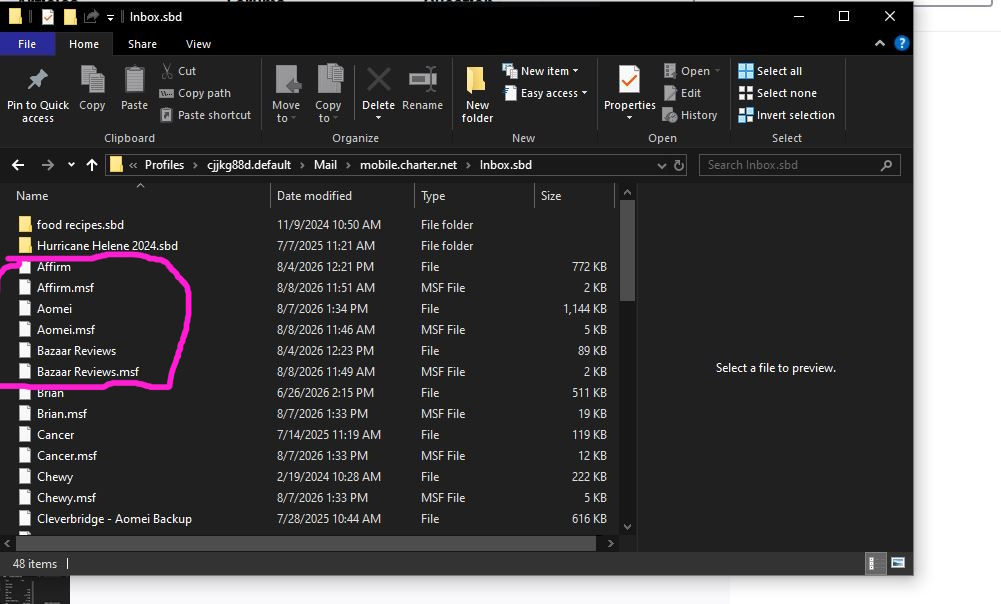
I have no idea why your subfolders Affirm, Amobei and Bazaar Reviews are empty after you moved them to another position in the folder pane. If your last screen shot has been made after you realised that those folders are empty this is astonishing since the corresponding mailbox files Affirm, Amobei and Bazaar Reviews have sizes between 89 kB and 1.144 kB. If those three files are still present with the sames sizes in the folder Inbox.sbd, you could return to the Inbox.sbd folder in the profile folder, exit Thunderbird and delete the three *.msf (index) files Affirm.msf, Amobei.msf and Bazaar Reviews.msf Then restart Thunderbird and verify if the missing messages are back.
Thank you my friend Mapenzi!
I have a very busy day and will have wait on this tomorrow. Wish me luck!
Good luck, Phyllis 😻
Thanks!
I was going to follow your instructions but I am so brain-fried from other things going on in my life and I completely forgot how to get to to those files you mention.
Could you please give me a cheat?
I'll try again tomorrow!
Go to Help > Troubleshooting Information > Profile Folder > Open Folder, then exit Thunderbird. In the profile folder go to Mail > mobile.charter.net > Inbox.sbd ....
Mapenzi,
Sorry I'm a day late in getting back to you.
I followed all of your directions and Aomei is nowhere to be found in Inbox. Affirm and Bazaar Reviews were both there and appeared to have something in them as they had a file size like you suggested. I deleted both of their msf files and restarted Thunderbird. Neither of those 2 folders have any email in them. Eeeeek! Now what or am I forever without these emails/files?
Thank you again!
Oops Mapenzi,
Sorry, forgot screenshot of what I had to work with.
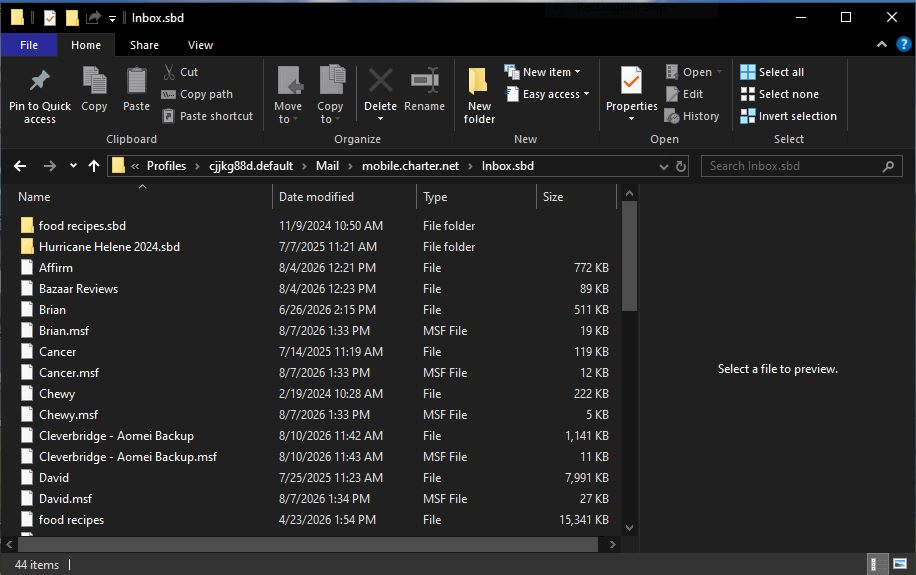
I have only one explication for the fact that the mailbox files "Affirm" and "Bazaar Reviews" have sizes > 0 kB but the correspondant Inbox subfolders "Affirm" and "Bazaar Reviews" are empty: the messages in those two subfolders must have been deleted by error or lost by some manoeuvre I cannot imagine. Fortunately deleting a message from a folder doesn't immediately delete the message text from the correspondant mailbox file in the profile. As long as the folder has not been "compacted" there is a possibility to retrieve deleted messages.
The easiest way to retrieve deleted messages is to install and use the add-on "Undelete" https://www.ggbs.de/extensions/Undelete.html In this thread in the mozillazine.org forum https://forums.mozillazine.org/viewtopic.php?p=15020650#p15020650 I described how to use this add-on. I have tested this add-on several times and it works perfectly. It might seem complicated for you use the add-on and you should only try to retrieve those messages if they are really important for you.
Athraithe ag Mapenzi ar
Réiteach Roghnaithe
Mapenzi
I think I can go as far as this point to find some of my missing emails. I was going to try to use that add-in but FireFox would not let me add it. But I'm OK now. There were a few missing emails but when I look at it all I only lost a few emails and found another folder that had the most important ones for me. So I'm OK.
So my fix happened a few messages back and was this in summary: If you click on the "twisty" (toggle) symbol to expand your Inbox folder like this ∨ Inbox you'll see all your "missing" subfolders in the folder pane. That's because I made all of my subfolders off of my INBOX
I really appreciate all of your time and attention to trying to help me....and fixing my issue! Thanks so much!