


Join us to show up for other Firefox users 🦊. Earn fun badges and Mozilla swag vouchers! Find out more: https://mzl.la/askafox150

Windows 10 reached EOS (end of support) on October 14, 2025. If you are on Windows 10, see this article.

Search Support

Avoid support scams. We will never ask you to call or text a phone number or share personal information. Please report suspicious activity using the “Report Abuse” option.

Learn More

Thunderbird - Sending e-mails stopped working

  • Gan freagra
  • 0 leis an bhfadhb seo
  • Open

Using Thunderbird forever, on my PC and also on my Android. On my PC sending messages stopped working "suddenly". (That means I did not change anything in Thunderbird. Windows related settings - who knows.)

__________________ Sending of the message failed. The message could not be sent because connecting to Outgoing server (SMTP) smtp.ionos.de failed. The server may be unavailable or is refusing SMTP connections. Please verify that your Outgoing server (SMTP) settings are correct and try again. __________________


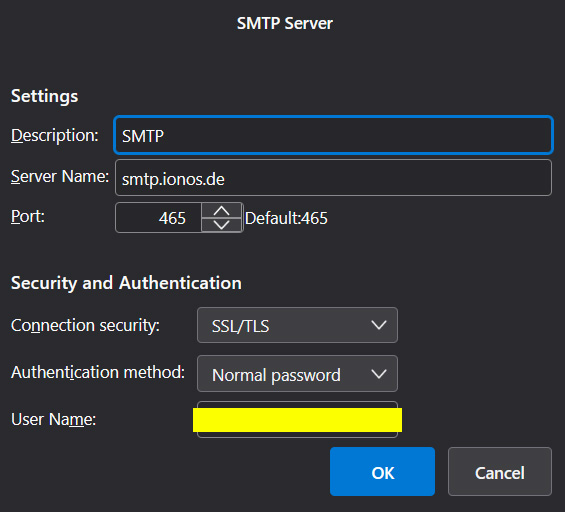
I have checked the SMTP server settings again, but it didn't solve the problem. I have changed my password of my e-mail account to anew one, reinstalled Thunderbird and recreated my account, but without anything changing. Receiving works, sending does not. Tried to install Outlook (sorry, just temporarily, I hope :) ) and there everything works just fine.

Maybe some Windows Firewall setting? Didn't find anything that seems to prevent Thunderbird from sending thou. Do you have any idea?
Using Thunderbird forever, on my PC and also on my Android. On my PC sending messages stopped working "suddenly". (That means I did not change anything in Thunderbird. Windows related settings - who knows.) __________________ Sending of the message failed. The message could not be sent because connecting to Outgoing server (SMTP) smtp.ionos.de failed. The server may be unavailable or is refusing SMTP connections. Please verify that your Outgoing server (SMTP) settings are correct and try again. __________________ I have checked the SMTP server settings again, but it didn't solve the problem. I have changed my password of my e-mail account to anew one, reinstalled Thunderbird and recreated my account, but without anything changing. Receiving works, sending does not. Tried to install Outlook (sorry, just temporarily, I hope :) ) and there everything works just fine. Maybe some Windows Firewall setting? Didn't find anything that seems to prevent Thunderbird from sending thou. Do you have any idea?
Attached screenshots

You must log in to your account to reply to posts. Please start a new question, if you do not have an account yet.