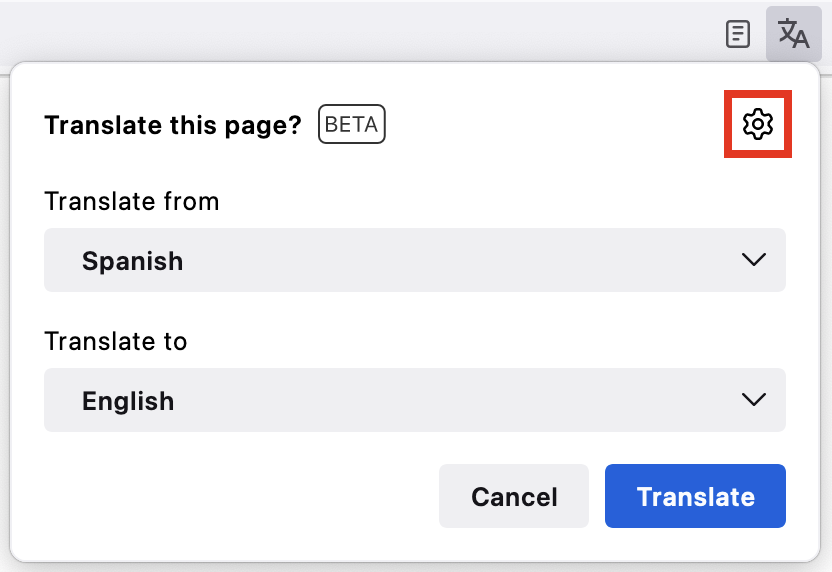
Automatic translation pop up window

Every time I open a new site or webpage, the automatic translation window pops up. I don't need translations and I have to choose "don't translate this page" again and again. I've searched everywhere on Firefox and I can't find a way to stop this. It is extremely intrusive and annoying. I don't understand why Firefox should decide for me what I want and what I don't want. Has anybody solved this problem.
All Replies (4)
Hello
Firefox Translation https://support.mozilla.org/en-US/kb/website-translation
Is it about Automatically popup an offer to translate on sites. https://connect.mozilla.org/t5/discussions/page-translation-pop-ups-on-off-switch/m-p/86163 1 - Go to Configuration Editor for Firefox https://support.mozilla.org/en-US/kb/about-config-editor-firefox 2 - Enter a search term browser.translations.automaticallyPopup and try value false
Let me just ask a supplementary question, Firefox Translation, is it your question.
Enable Firefox translations powered by the Bergamot translations browser.translations.enable
1 - Go to Configuration Editor for Firefox 2 - Enter a search term browser.translations.enable and try value false Restart Firefox.
Athraithe ag Agent virtuel ar
I am not computer savvy enough to use the Configuration Editor and I don't think that there are many "regular" users who are. I just want to stop the automatic popup that offers translations. It can't be so difficult for Firefox to modify this feature in order to allow users to turn it off. This is an extremely non-userfriendly situation.
- On the right-hand side of the toolbar, click the translation icon.
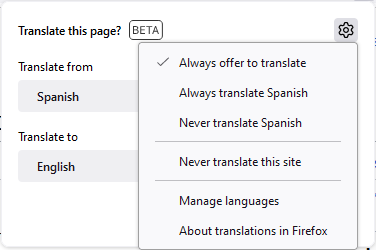
- Click the cog icon located on the top right side of the translation panel.
- Turn off Always offer to translate.