


Can I remove the -- (2 lines) above a Signature ?

Hi
I'm new on Thunderbird and so far it offers many options and has great potential for everyone to customize it. Thats good.
I try to include Mail Text from another App by loading it as Signature. Then I only need to open the mail and the text is already in there. Great.
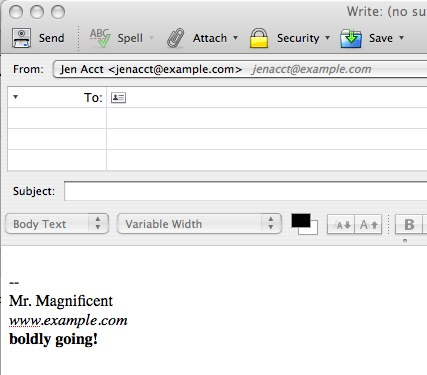
Unfortunately Thunderbird adds a "--" (2 lines) above my "Signatur".
Is there eighter another way to insert my Mail-Text ? or a Way to remove the "--" ?
See also Picture from Thunderbird Held that shows this too.
PS: I don't know why these "--" need to be added ? Even for a regular Signature this does not look so good. Everybody with a Signature can customise a line by himself.
Thank you
Réiteach roghnaithe
The -- is an internet standard to signal the email client to remove signature on reply. To remove it, here are instructions: Click settings>general and scroll down to bottom to 'config editor' - click to open it. look for this line: mail.identity.default.suppress_signature_separator; false Double click to toggle 'false' to 'true' or right click on line and select 'Toggle' Close config editor - top right X click on OK to save changes.
Read this answer in context 👍 2All Replies (3)
Réiteach Roghnaithe
The -- is an internet standard to signal the email client to remove signature on reply. To remove it, here are instructions: Click settings>general and scroll down to bottom to 'config editor' - click to open it. look for this line: mail.identity.default.suppress_signature_separator; false Double click to toggle 'false' to 'true' or right click on line and select 'Toggle' Close config editor - top right X click on OK to save changes.
Hello David
Wow, I'm impressed.
It's solved.
PS: I have to say, this is the very first time where I ask a Question in a Community and there are no unuseful, rude or stupid answers but just a simple Solution. I'm impressed. Very good.
You're very welcome. We try to please. :)