


After WIN 10 regular update Thundebird. exe file was moved?

After reinstalling I get the following question-after start up. I don't trust this, And I have to do dis every time after start up Thunderbird. See image
All Replies (8)
Image? Please try that again.
Hello Mat I send it again
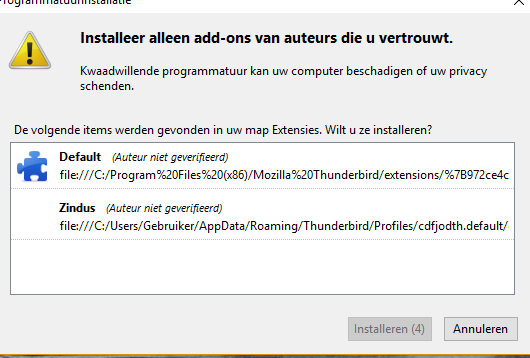

Here is the text on that page translated from Dutch to English.
Only install add-ons from authors you trust.
Malicious software can damage your computer or violate your privacy.
The following items were found in your Extensions folder. Do you want to install them?
Default (Author not verified) file:///C:/Program%20Files%20(x86)... zindus (Author not verified) file:///C:/Users/User /AppData/Roaming/Thunderbird/Profiles/cdfjodth.default/...
I must say that I don't understand what's going on here.

Zindus is dead anyway. It shouldn't be there anymore in the first place.
After de regular update windows 10, the icon of thunderbird was gone , and after start up -true windows start up it was said -Thunderbird.exe has moved. After reinstalling THunderbird I had everything back, but every start-up of thunderbird I have tot first reinstall these ad-ons before I could use Thunderbird
Delete the extension folder for Zindus. Then start Thunderbird and let it install the Default Theme if prompted again. Why you get the prompt in the first place, I don't know. But this is nothing malicious.
Thank you for your fast service.
When your problem is fixed, can you mark the topic as 'Solved' please? Thank you.