


Cannot remove "File Here" when send copy to is used.

After I send a message and I want to send a copy to my mail box, I do as described above: I use - Options, send a copy to, email, inbox, FILE HERE appears. I do not want it to "File Here" . This just started recently and is NOT a problem with the other two email addresses I use. I simply want the copy to go the the mail box. I must be missing something simple. Thank you for the help!
All Replies (12)

I don't understand: "I simply want the copy to go the the mail box". …the mail box… doesn't make any sense to me. You have to choose a folder.
Does the location you selected have subfolders? Looking at my own Thunderbird I see what might be "File Here" but only in folders with subfolders.
(I don't see "File Here", but I'm running a beta version and and where I think you see "File Here", I see the name of the current folder repeated.)
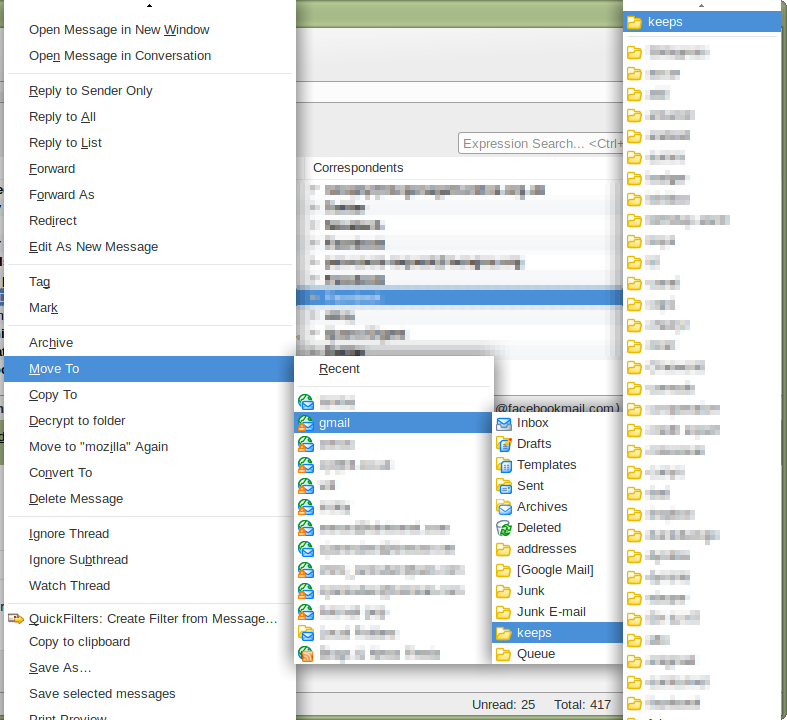
You are correct -- it does not belong there. I tried to make a print scan but the type disappears before it will copy. I have chosen a folder BUT a box appears the states - FILE HERE. Nothing happens after that.
Here are my steps: I have typed a message. Before sending I want to :send a copy of the message to my Inbox at the inbox address from which I am about to send the message. I click on "Options" then "Send a copy to", I click on the email account that I want the message to be copied to. Then when the menu appears, I click on "Inbox" for that account. That is when an arrow appears and the "File Here" option appears. It doesn't go anywhere. Normally it would go immediately to the in box of the account selected. WOW !! Hope that helps both of us...lol
Focusing on the end result, how about trying something different?
When writing the e-mail, Cc or Bcc yourself. Simple and straightforward to get the result you want.
In case you don't understand...
Add another "To" line, click on the word "To" and in the drop-box, choose Cc or Bcc. Put your e-mail address there.
Cc means carbon copy. The recipient will see that you also sent the e-mail to the Cc address.
Bcc means "Blind Carbon Copy". The recipient will not see that the e-mail was also sent to the Bcc address.
Athraithe ag user1121639 ar
I completely understand. I have been doing that for the past few days. I will continue, unfortunately, that means there is a bug in the program. I'll leave that to you all. Thank you for your input.
If you want every e-mail you send to be also be CC or BCC to an address (your own in this case):
Thunderbird menu: Tools: Account Settings Select "Copies & Folders" on the left side under the e-mail account concerned. On the right side under "When sending messages, automatically", checkmark the Cc or Bcc and put the e-mail address in there.
Thank you but I only use it selectively and I will continue to use the "work around". Again, I appreciate you taking the time to respond to my question. Cheers!
I don't see it as a bug.
I have never used this feature before. In my experience it has always been greyed out, probably because I'm using other add-ons to facilitate moving of messages. However in Safe Mode it becomes active.
I stand by my previous comment; I see "File Here" only when there are subfolders in the selected folder. The "File Here" option is necessary to allow you to say "No, this folder, not one of its children".
Say you want to copy to Inbox, but that Inbox has children. So when you click on Inbox, you could mean one of two things:
- put the copy here, in Inbox
- open Inbox so I can select a child folder
"File here" allows you to choose between these options. How would you propose to do it any other way?
I use CopySentToCurrent to assist with making copies, so I don't have to remember to make a copy. I also use QuickFolders which has a superb "move to" function where it searches for you, based on a few typed characters. This works so well that you start to resent all the other dumb file pickers that make you scroll through lists of accounts and folders. Why search when you have a computer that is capable of doing it for you, far more efficiently and quickly?
Thank you for your time and help. I will try your suggestions. Cheers.
Really, what add-ons do you have installed?
Matt, Extensions: DictionarySearch, Highlighter, Lightning and Plugins: Shockwave Flash (with options). That's about it.
I am not quite sure what the choices that include "file here" are, as opposed to the folders that have nothing. But my guess is that folders that have sub folders (or in the case of imap folders even hidden sub folders the text "file here" appears to make explicit the choice you are making. Having selected those without and those with a file here. I can not see any practical difference between the two. except "file here" is a more explicit selection of which folder you are choosing.