


Windows 10 reached EOS (end of support) on October 14, 2025. If you are on Windows 10, see this article.

Search Support

Avoid support scams. We will never ask you to call or text a phone number or share personal information. Please report suspicious activity using the “Report Abuse” option.

Learn More

Cuireadh an snáithe seo sa chartlann. Cuir ceist nua má tá cabhair uait.

How do I stop my view from collasping each time I go back to the screen? I have the view sorted by Date/Descending/Grouped by Sort.

  • 2 fhreagra
  • 2 leis an bhfadhb seo
  • 153 views
  • Freagra is déanaí ó sadielady303

I've just upgraded to Thunderbird 45.1.0. I view my email as follows. View>Sort by>Date-Descending-Grouped by Sort. I'm accustomed to when going into Thunderbird mail all the dates are expanded and I can view a complete listing of all emails for under each grouping of Today/Yesterday/Last Week/Two Weeks Ago/Older. Since the new upgrade to 45.1.0 these categories are collapsed each time I open mail or go back and forth and I have to click on each sideways triangle to expand. I haven't been able to determine how to keep the view expanded as a default. The older Thunderbird version kept the expanded view.
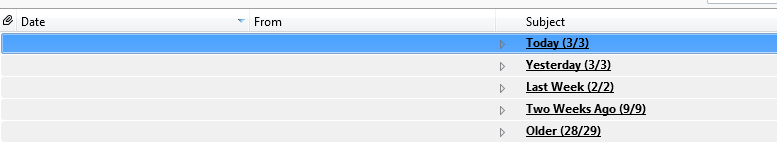
I've just upgraded to Thunderbird 45.1.0. I view my email as follows. View>Sort by>Date-Descending-Grouped by Sort. I'm accustomed to when going into Thunderbird mail all the dates are expanded and I can view a complete listing of all emails for under each grouping of Today/Yesterday/Last Week/Two Weeks Ago/Older. Since the new upgrade to 45.1.0 these categories are collapsed each time I open mail or go back and forth and I have to click on each sideways triangle to expand. I haven't been able to determine how to keep the view expanded as a default. The older Thunderbird version kept the expanded view.
Attached screenshots

Réiteach roghnaithe

You need to select the expanded option. 'View' > 'Threads' > 'select: 'Expand all threads.

Read this answer in context 👍 2

All Replies (2)

Réiteach Roghnaithe

You need to select the expanded option. 'View' > 'Threads' > 'select: 'Expand all threads.

Thanks a million Toad-Hall!!!