


SSL errors on all websites. Was clearing roaming/mozilla, deleted all files.
Hello!
I was clearing firefox from my system to reinstall it from scratch. I went into %appdata% and deleted Mozilla's folder completely. Now when I reinstall firefox, it doesn't even let my sync my account - everything shows up as untrusted SSL with the Error code: sec_error_unknown_issuer. Can someone please help me out?
Réiteach Roghnaithe
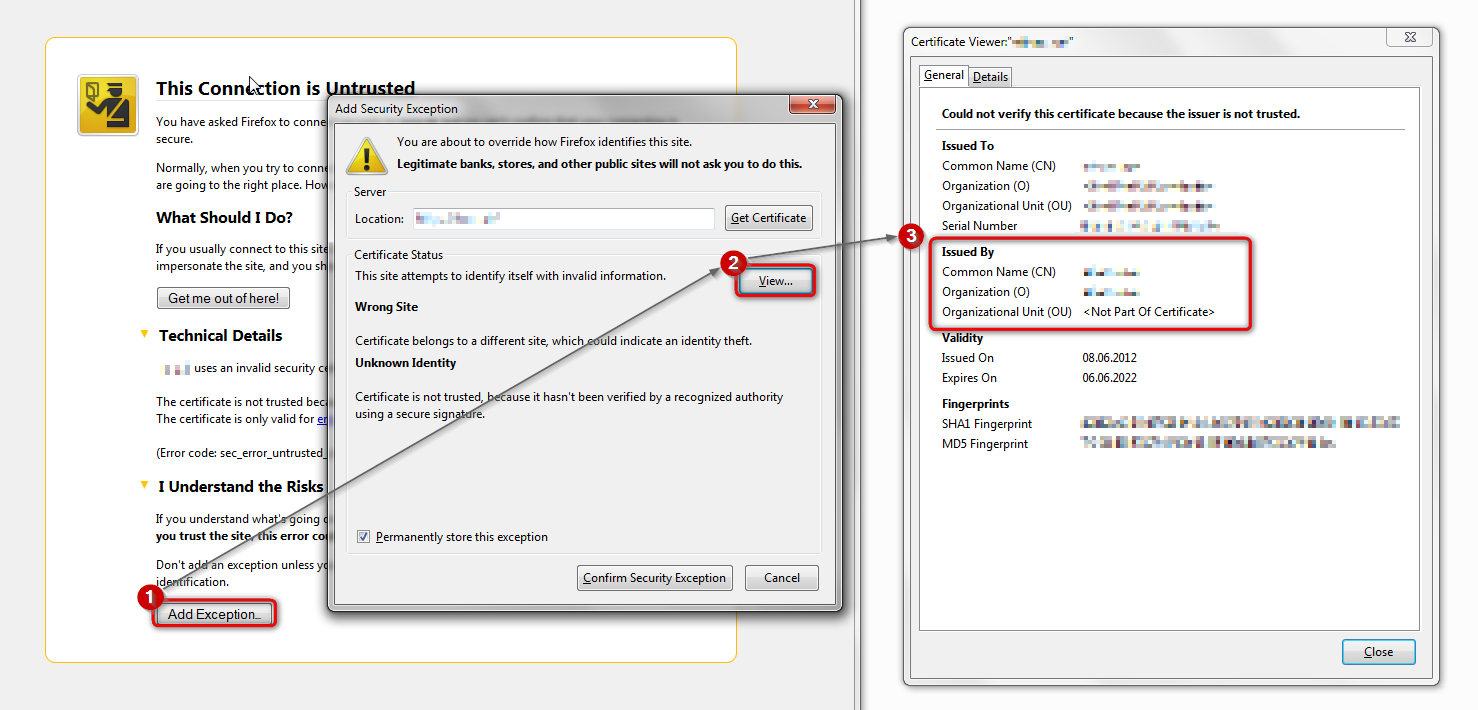
please attempt to add an exception on the bottom of the error page & inspect the certificate (see the screenshot attached for instructions):
- which issuer information does the certificate contain?
All Replies (5)
hello, what security program are you using on the affected pc?
I'm running Windows 10 build 9879 (x64) with Qihoo 360 Total Security. I tried disabling it + Windows firewall - didn't help. I had firefox reinstalled a couple of times before on this build with no issues, was running nightly, aurora and beta builds. Now I can't run any of them without being affected by this issue.
Réiteach Roghnaithe
please attempt to add an exception on the bottom of the error page & inspect the certificate (see the screenshot attached for instructions):
- which issuer information does the certificate contain?
Thank you, your picture pointed me to the issue - it was Adguard blocking everything. I disabled it and everything is working just fine! Going to contact them about this issue to see if they can fix their program.
ok, they already seem to have an article at hand for this issue: https://kb.adguard.com/index.php?/Knowledgebase/Article/View/21/10/the-connection-is-not-trusted