

Ketju on arkistoitu.
Esitä kysymys, jos tarvitset apua.

Arkistoitu
I'm using firefox 6.0.2 It's making problem with Bangla font ONLY on FACEBOOK others bangli website FORNT SIZE are OK. On the FACEBOOK it shows Bangla font in a very / Too small! I change font SIZE in firefox setting but i can't solve. Pls HELP me

I'm using firefox 6.0.2 It's making problem with Bangla font ONLY on FACEBOOK others bangli website FORNT SIZE are OK. On the FACEBOOK it shows Bangla font in a very / Too small! I change font SIZE in firefox setting but i can't solve. Pls HELP me ..
I'm using firefox 6.0.2 It's making problem with Bangla font ONLY on FACEBOOK others bangli website FORNT SIZE are OK. On the FACEBOOK it shows Bangla font in a very / Too small! I change font SIZE in firefox setting but i can't solve. Pls HELP me ..
Muokattu , muokkaaja mnhshare
Kaikki vastaukset (2)
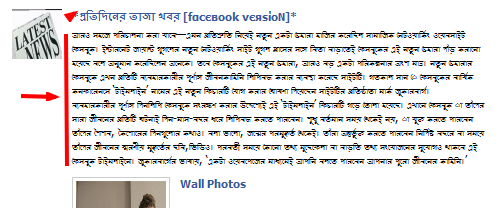
my problem shown as IMAGE
Reset the page zoom on pages that cause problems: View > Zoom > Reset (Ctrl+0 (zero); Cmd+0 on Mac)
You can use an extension to set a default font size and page zoom on web pages.
- Default FullZoom Level: https://addons.mozilla.org/firefox/addon/default-fullzoom-level/
- NoSquint: https://addons.mozilla.org/firefox/addon/nosquint/