

Ketju on arkistoitu.
Esitä kysymys, jos tarvitset apua.

Ratkaistu
Arkistoitu
Suddenly, Thunderbird can receive but not send gmail email with a password error.

Within the last few days, I have been able to receive and download email normally, but not send. When I send, I get a password error.
Things I have tried to no avail:
- CAPTCHA unlock
- Deleting all of the passwords in Options -> Security -> Saved Passwords
- Manually typing the password into the password field on failure
- Verifying that my Google account is set for "Access for less secure apps” and I am not using two-factor auth
- Logging in with the same password via the browser works just fine for send and receive emails
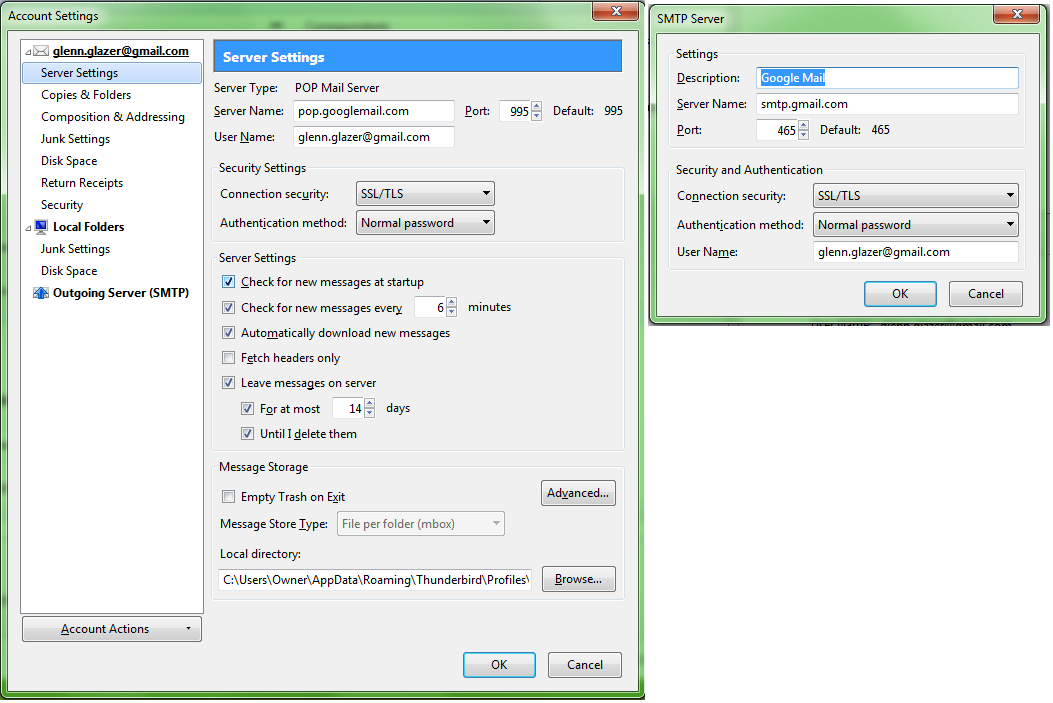
Account settings in image below.
Within the last few days, I have been able to receive and download email normally, but not send. When I send, I get a password error.
Things I have tried to no avail:
* CAPTCHA unlock
* Deleting all of the passwords in Options -> Security -> Saved Passwords
* Manually typing the password into the password field on failure
* Verifying that my Google account is set for "Access for less secure apps” and I am not using two-factor auth
* Logging in with the same password via the browser works just fine for send and receive emails
Account settings in image below.
Kaikki vastaukset (2)
Image didn't upload on first try, here it is.
Valittu ratkaisu
Solved. Apparently changing my password on google accounts and then updating Thunderbird work.
Helliphino why.