


I get a malware blocked when I open Firefox only, and I woild like to remove this url.

A message window opens with Firefox, saying it blocked a malware url. How can I delete this url?
Kaikki vastaukset (4)
Can you attach a screenshot?
- https://support.mozilla.org/en-US/kb/how-do-i-create-screenshot-my-problem
- use a compressed image type like PNG or JPG to save the screenshot
You can check the target line in the Firefox desktop shortcut (right-click: Properties) to make sure nothing is appended after the path to the Firefox program.
You can check the home page setting.
- Options/Preferences -> General -> Startup: Home page
- https://support.mozilla.org/en-US/kb/how-to-set-the-home-page
Firefox supports multiple home pages separated by '|' (pipe) symbols.
I am trying to send a screenshot
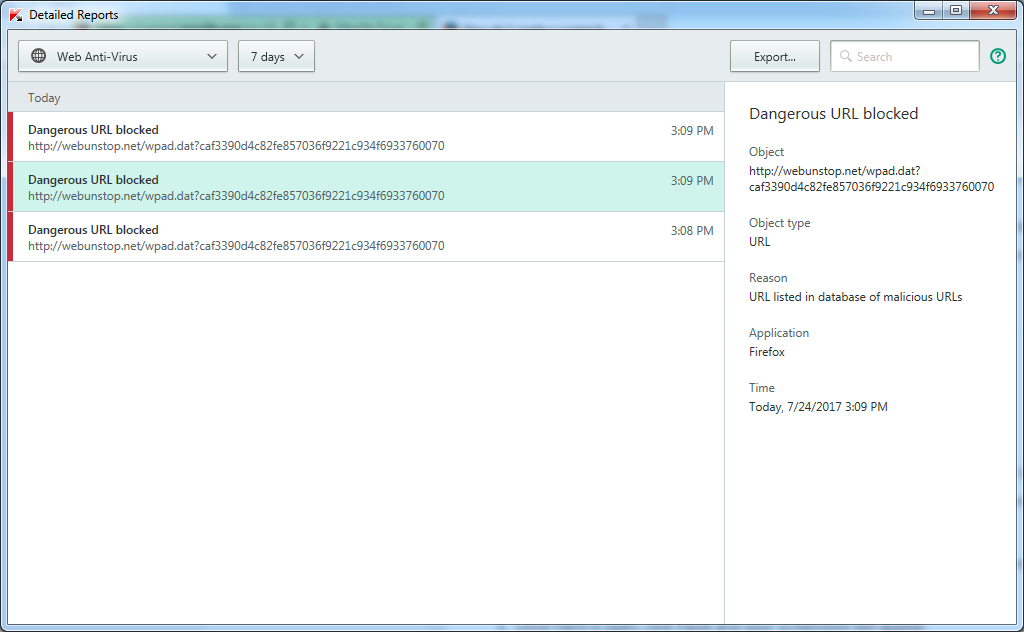
I'm not sure about this website.
I do see malware reports about webunstop.org, but not about webunstop.net that shows in the screenshot.
Try : https://support.mozilla.org/en-US/kb/troubleshoot-firefox-issues-caused-malware If any thing is found keep a copy of the logs and go to a forum of your choice for help removing any left overs. Note : post in only 1 anti-malware forum.
Please let us know if this solved your issue or if need further assistance.