Showing questions tagged:

Digital signing and encrypting : Where can I see/read what EXACTLY causes an "Invalid Signature" of/in an received mail ?

Dear all, When receiving signed AND encrypted mails from an Outlook-account I get the exclamation sign for the signature. The message is (German) : "Digitale Signatur ist… (read more)

Dear all,

When receiving signed AND encrypted mails from an Outlook-account I get the exclamation sign for the signature.

The message is (German) : "Digitale Signatur ist ungültig Diese Nachricht enthält eine digitale Signatur, die aber ungültig ist. Die Nachricht wurde mit einer Verschlüsselungsstärke signiert, die von dieser Version Ihrer Software nicht unterstützt wird. Signiert von...."

I already did all standard checks (trusted, new hash algorithm and so on),

Now I would like to know the EXACT reason why Thunderbird is not accepting the digital signature. How can I accomplish this?

THX in advance and best regards!

Open 4 4

S/MIME Class 1

2026-04-25 SAT 14:45 BST I have boujht a DigiCert S/MIME Class 1 certificate from thesslstore, but I have not yet got it. They sent me 3 .crt files, but I have not unde… (read more)

2026-04-25 SAT 14:45 BST I have boujht a DigiCert S/MIME Class 1 certificate from thesslstore, but I have not yet got it. They sent me 3 .crt files, but I have not understood how to use them. I hope someone can explain the problem and/or suggest what I can do about it please ? I do not remember having this sort of problem in previous years.

Open 3 10

Błąd podczas zapisywania szkicu

Dzień dobry, podczas tworzenia wiadomości i próbie zapisania jej na później, otrzymuję komunikat: Ostrzeżenie Błąd podczas zapisywania szkicu - W Twojej bazie kluczy nie … (read more)

Dzień dobry, podczas tworzenia wiadomości i próbie zapisania jej na później, otrzymuję komunikat:

Ostrzeżenie Błąd podczas zapisywania szkicu - W Twojej bazie kluczy nie można odnaleźć identyfikatora klucza „0xD3ADE4868E262032”.

Nie potrafię tego naprawić. System iOS na Mac.

Proszę o wsparcie.

Pozdrawiam

Open 1 8

certificate problems

Why do I suddenly (from one day to another) receive the message: "Das Zertifikat für imap.gmail.com stammt nicht von einer vertrauenswürdigen Quelle." when trying to dow… (read more)

Why do I suddenly (from one day to another) receive the message: "Das Zertifikat für imap.gmail.com stammt nicht von einer vertrauenswürdigen Quelle."

when trying to downlowd messages from Gmail?

I have not changed anything at all.

Solved 4 7

Smartcards & broken GPG support

Hello, I am writing this message in regards to Thunderbird's GPG support after v68, in the last hope that someone suggests a solution that moves me away from version 68. … (read more)

Hello,

I am writing this message in regards to Thunderbird's GPG support after v68, in the last hope that someone suggests a solution that moves me away from version 68. I consider the current state broken.

My PGP keys reside on a Yubikey, but smartcard usage has been broken after v68, as none of the supposedly correct setups work. It should work pretty much out of the box, but it doesn't. The whole idea of moving away from Enigmail without having a properly, fully implemented support, including for smartcards, or at least for working with GPG, was utterly misguided, IMO, and broke the once nice client.

I enabled gpg usage and fetching in Settings, I imported my pubkeys to Thunderbird's PGP manager, then added my external key (with GPG). Everything looks fine. But when I click an encrypted message, I get "The secret key that is required to decrypt this message is not avaliable". Nah, it's available and it's there! The pinentry isn't appearing at all and this is the result. I believe this is TB's fault, as the pinentry correctly appears with everything else I do, also with TB 68 + Enigmail. The setup is the same. I am using the latest Gpg4win.

Settings:

mail.openpgp.allow_external_gnupg - true mail.openpgp.fetch_pubkeys_from_gnupg - true mail.openpgp.alternative_gpg_path - has no effect whether set or not

gpg-agent.conf:

enable-win32-openssh-support default-cache-ttl-ssh 900 max-cache-ttl-ssh 1800 no-allow-external-cache default-cache-ttl 300 max-cache-ttl 3000 ignore-cache-for-signing allow-loopback-pinentry

gpg.conf:

utf8-strings auto-key-locate local use-agent

FYI, adding "pinentry-program" has no effect on solving the problem, whether set or not.

Your suggestions are welcome!

Solved 1 31

How secure is Thunderbird Filelink really?

Thunderbird Filelink uses end-to-end encryption and files are only encrypted/decrypted locally but unless the code running on your system is reviewed and validated you do… (read more)

Thunderbird Filelink uses end-to-end encryption and files are only encrypted/decrypted locally but unless the code running on your system is reviewed and validated you don't really know what it does. I would think that every time recipients click on the link and use the web interface to download a file, their browser is sent a script that does the decoding. Similarly, if you use the web interface of a Send instance to send a file, your browser is sent a script for encoding.

If the above is correct, how do we know these scripts are always the open source scripts that have been independently validated? Isn't it conceivable that a Send instance may send you a customized script for encryption/decryption that compromises encryption? This could be done with selected targets to avoid attracting attention too.

Open 2 45

Exporting PGP encrypted messages as decrypted .eml

I am trying to export multiple messages that were sent to me encrypted with my pgp key as .eml files that contain the unencrypted message without needing to be decrypted.… (read more)

I am trying to export multiple messages that were sent to me encrypted with my pgp key as .eml files that contain the unencrypted message without needing to be decrypted. When using the default save function and ImportExportToolsNG on both server messages and locally stored messages, the .eml files exported just contain the encrypted pgp message block. Is this possible or will I have to manually decrypt each message?

Open 22

bluehost ssl not trusted

Hello I just recently purchased a new SSL certificate for our domain from bluehost. Now I get the following error message from Thunderbird. Configuration not trusted. W… (read more)

Hello

I just recently purchased a new SSL certificate for our domain from bluehost. Now I get the following error message from Thunderbird.

Configuration not trusted. We received the configuration for your email over a connection that isn't as secure as we'd like. This means there is a tiny chance that someone could have altered it. Double check provided configuration.

I entered my server dashboard and compared the manual email settings and the settings match exactly.

I have paused anti-virus software on both my mobile and laptop and have uninstalled and reinstalled Thunderbird but nothing helped. Contacted Bluehost all is working fine. I can access my email from other clients but not from Thunderbird.

Any thoughts thanks

Gary K.

Open 26

Thunderbird sometimes fails to decrypt messages

In my work account on a Microsoft Exchange server, we have public keys for all users in LDAP. Sometimes an encrypted email message from a known user fails to decrypt, ins… (read more)

In my work account on a Microsoft Exchange server, we have public keys for all users in LDAP. Sometimes an encrypted email message from a known user fails to decrypt, instead showing a panel with no menu: "Thunderbird cannot decrypt this message". Errors are sporadic: for a few senders, all messages fail to decrypt on my Thunderbird, while for a few other senders, all messages successfully decrypt. For most senders, it seems to randomly depend on the particular message. In one odd case, a chain of replies can be successfully decrypted up to a point, and from there on, all replies fail to decrypt for me. We've looked into all the settings, and we've tried variations where someone sends me an encrypted message without signature, then another with encryption and signature. Nothing seems to consistently cause or avoid the error, it just seems to happen randomly.

Can someone recommend a way to diagnose the problem, for example debug logs?

It would also be helpful to try manually decrypting the raw received message using openssl. Is it possible to find it somewhere in the `~/.thunderbird/` area?

Open 20

I received notifications that I had a unsecure Certificate

I received 2 notifications stating that 1) The certificate for imap.gmail.com does not come from a Trusted Source and 2) You are about to override how Thunderbird Identif… (read more)

I received 2 notifications stating that 1) The certificate for imap.gmail.com does not come from a Trusted Source and 2) You are about to override how Thunderbird Identifies this site. Legitimate banks, stores and other public sites will not ask you to do this. This site attempts to identify itself with invalid information. The certificate is not trusted because it hasn't been verified as issued by a trusted authority using a secure Signature. I have been with Thunderbird for around 20 years and have contributed to it twice, so please help me!

Open 1 41

importing pgp keys from Thunderbird on Linux to Thunderbird on Windows 11 produces error

On my Linux machine, I exported the public key for an email address in Thunderbird 140.8.0esr (64-bit) into a file. I transferred the file to my Windows 11 machine via Wa… (read more)

On my Linux machine, I exported the public key for an email address in Thunderbird 140.8.0esr (64-bit) into a file. I transferred the file to my Windows 11 machine via Warpinator.

On the Windows machine I am running Thunderbird 148.0.1 (64-bit). In Account settings>End-to-End encryption, I click Add Key>Import an existing OpenPGP key>Select File to import, and then I select the file.

I get an error message: Error! Failed to import file.

I'm surprised. I would think that going from one installation of Thunderbird to another would work this way. I am concerned that I won't be able to read incoming encrypted emails without the key working.

Can someone help me?

Solved 7 86

problem with certicate

I receive a lot of Thunderbird messages with this text (in French) : "Le certificat pour imap.gmail.com ne provient pas d’une source sûre." What I have to do please Thnx … (read more)

I receive a lot of Thunderbird messages with this text (in French) :

"Le certificat pour imap.gmail.com ne provient pas d’une source sûre."

What I have to do please Thnx

Solved 1 30

Repeated gmail problem with error message: "The certificate for imap.gmail.com:993 does not come from a trusted source"

I have problems every time I try to fetch my imap gmail, with Thunderbird complaining that: "The certificate for imap.gmail.com:993 does not come from a trusted source". … (read more)

I have problems every time I try to fetch my imap gmail, with Thunderbird complaining that: "The certificate for imap.gmail.com:993 does not come from a trusted source".

As near as I can tell, imap.gmail.com:993 is still the recommended setting for

Version is Thunderbird 148.0.1 (64-bit). Adding an exception for the missing certificate does not seem to make a bit of difference.

I do not know if the use of Bitdefender as my security and vpn software is a factor. I notice that the certificate (exception certificate?) shown when I click on View Certificate in my gmail account settings appears to mention Bitdefender, so perhaps that's a factor. That certificate looks as follows:

Certificate Subject Name Common Name imap.gmail.com Issuer Name Country US Organizational Unit IDS Organization Bitdefender Common Name Untrusted Bitdefender CA Validity Not Before Mon, 02 Feb 2026 08:37:57 GMT Not After Mon, 27 Apr 2026 08:37:56 GMT Subject Alt Names DNS Name imap.gmail.com Public Key Info Algorithm Elliptic Curve Key Size 256 Public Value 04:2D:20:DA:19:33:1D:AC:28:91:52:02:EB:B8:7E:33:C0:B7:E4:F3:5E:4E:88:92:E5:7E:BB:30:0C:6C:E4:84:A8:3D:D7:49:9B:22:C8:C0:BB:01:80:4B:84:30:3A:3B:73:70:8F:AB:EB:C0:F0:D5:7B:8B:0B:64:1B:DC:76:67:41 Miscellaneous Serial Number 1A:50:ED:15:50:A1:A7:93:5D:05:8A:CD:85:A5:15:FD Signature Algorithm ECDSA with SHA-256 Version 3 Download PEM (cert)PEM (chain) Fingerprints SHA-256 12:8A:58:44:DF:B5:E1:E4:EF:CC:F7:35:09:BA:6E:88:86:16:15:78:F9:28:52:23:FC:0E:E9:69:D1:AF:21:86 SHA-1 A3:30:CB:65:39:51:46:9B:3B:BC:0B:B9:09:DD:26:40:A8:52:25:3D

Open 4 106

The certificate for imap.googlemail.com does not come from trusted source

Running Thunderbird 140.8.0esr 64bit Windows 11 Home, v25H2 932GB storage 32GB ram i7-13700k Recently, I've started getting the following message every time I launch T… (read more)

Running Thunderbird 140.8.0esr 64bit Windows 11 Home, v25H2 932GB storage 32GB ram i7-13700k

Recently, I've started getting the following message every time I launch Thunderbird: "The certificate for imap.googlemail.com does not come from a trusted source."

Digging into details I get: "you are about to override how Thunderbird identifies this site" "Location: imap.googlemail.com:993" "This site attempts to identify itself with invalid information" "Unknown Identity. The certificate is not trusted because it hasn't been verified as issued by a trusted authority using a secure signature."


Digging deeper into the certificate I find the issuer is Bitdefender who I use for antivirus and VPN. However, the VPN shows no effect when enabled or disabled. The validity period is 2 Feb 2026 to 27 Apr 2026

l can get email, but cant send it. Is Bitdefender at fault?

I'm stumped. What should I do???

Solved 1 2 115

certificate for imap <edited>@peternedsmith.co.uk is not valid

certificate for imap <edited>@peternedsmith.co.uk is not valid, someone could be trying to impersonate the server and you should not continue, on clicking the more … (read more)

certificate for imap <edited>@peternedsmith.co.uk is not valid, someone could be trying to impersonate the server and you should not continue, on clicking the more info, on the panel that comes up, if I click on get certificate, the selections below get greyed out and nothing happens, I have viewed the certificate, and it appears to be from the US, I have taken a screenshot of the top part of it, which is below. Regards Peter Smith

Open 1 97

Thunderbird Beta and Release: External GnuPG Keys Not Working with GnuPG 2.5.x

DEUTSCH (English see below(: Hallo zudammen, Konfiguration: - Window11 25H2 (aktuell) - Thunderbird Beta-6 (BuildID=20260213180051) - gpg2.5.17 (Gpg4Win 5.0.1); siehe au… (read more)

DEUTSCH (English see below(:

Hallo zudammen,

Konfiguration: - Window11 25H2 (aktuell) - Thunderbird Beta-6 (BuildID=20260213180051) - gpg2.5.17 (Gpg4Win 5.0.1); siehe auch: <https://www.gpg4win.de/>

Der bisherige und standarmärige Installationspfad von "Gpg4Win": "C:\Progam Diles (x86)\Gpg4Win\" wurde softwareseitig auf: "C:\Progam Diles\Gpg4Win\" geändert!

Bug 1967121 (Closed) => thunderbird148 --- fixed! <https://bugzilla.mozilla.org/show_bug.cgi?id=1967121>

Zur Zeit verfolge ich die Änderungen bezüglich der externen Schlüsselverwaltung in Thunderbird-Beta, da das Arbeiten mit externen Schlüsseln in der esr- und in der relesease-Version von Thunderbird seit der offiziellen Herausgabe von gpg2.5.x absolut nicht mehr möglich ist! Die geheimen Schlüssel für das Entschlüsseln und Signieren werden mit gpg2.5.x nicht mehr gefunden!

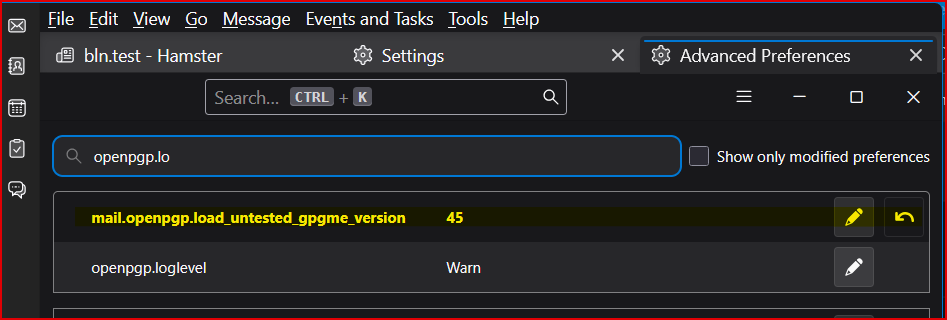
In der Schlüsselverwaltung von TB-Beta befinden sich meine öffentlichen Schlüssel und alle öffentlichen Schlüssel meiner Kommunikationspartner. Extern sind meine geheimen Schlüssel gelagert. Folgende Präferenz wurde aufgrund von gpg2.5.x hinzugefügt:

https://assets-prod.sumo.prod.webservices.mozgcp.net/media/uploads/images/2026-02-26-10-04-58-df59be.png

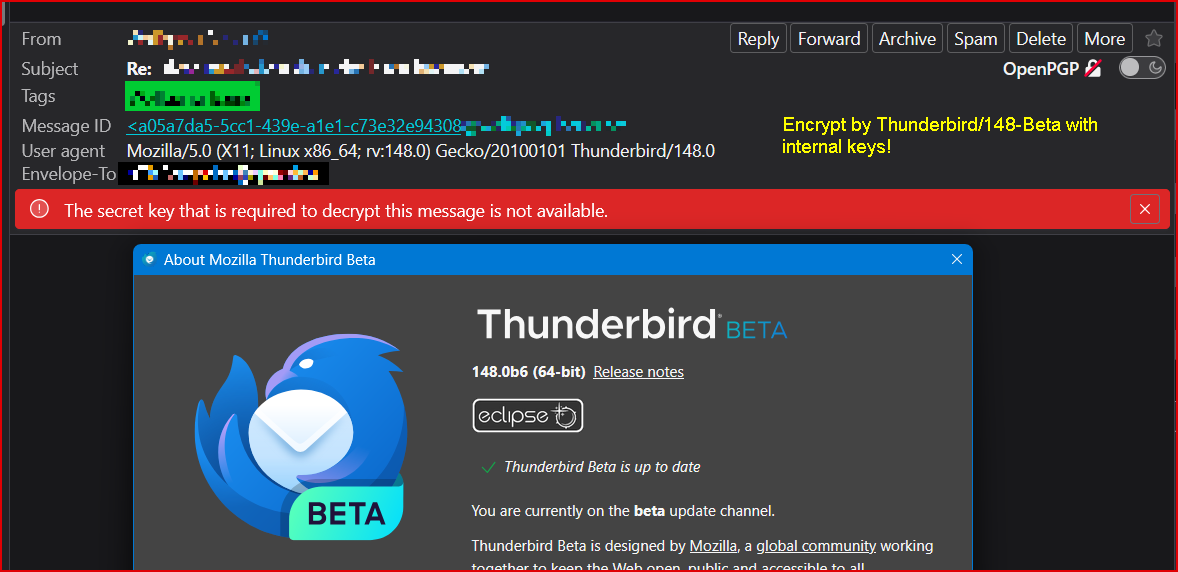
Allerdings erscheint nach all diesen Maßnahmen die Fehlermeldung: "The secret key that's required to decrypt this message is not availlable."

https://assets-prod.sumo.prod.webservices.mozgcp.net/media/uploads/images/2026-02-26-10-05-45-d8280e.png

Mit Herausgabe von Thunderbird/148.0 (release) sind dort die gleichen Probleme mit der externen Schlüsselverwaltung zu bepbachten!

Mit Versionen gpg < 2.5 funktioniert unter Windows alles problemlos!

UNTER LINUX haben hier Änderungen an der Präferenz: "mail.openpgp.load_untested_gpgme_version" nachweislich keinerlei Auswirkungen!

Was übersehe ich?

++++++++++++++++++++++++++++++++++++++++++++++++++++++++++++++++++++++++

ENGLISH:

Hello,

Configuration: - Window11 25H2 (current status) - Thunderbird Beta-6 (BuildID=20260213180051) - gpg2.5.17 (Gpg4Win 5.0.1); see also: <https://www.gpg4win.de/>

The previous and default installation path of "Gpg4Win": "C:\Program Files (x86)\Gpg4Win\" has been changed by the software to: "C:\Program Files\Gpg4Win\"!

Bug 1967121 (Closed) => thunderbird148 --- fixed! <https://bugzilla.mozilla.org/show_bug.cgi?id=1967121>

At the moment, I’m following the changes regarding external key management in Thunderbird Beta, because working with external keys in the ESR and release versions of Thunderbird has become absolutely impossible since the official release of gpg 2.5.x! The secret keys required for decryption and signing are no longer found when using gpg 2.5.x!

In Thunderbird Beta’s key manager, my public keys and all public keys of my communication partners are present. My secret keys are stored externally. The following preference was added because of gpg 2.5.x:

https://assets-prod.sumo.prod.webservices.mozgcp.net/media/uploads/images/2026-02-26-10-04-58-df59be.png

However, even after all these measures, the following error message appears: **"The secret key that's required to decrypt this message is not available."**

https://assets-prod.sumo.prod.webservices.mozgcp.net/media/uploads/images/2026-02-26-10-05-45-d8280e.png

With the release of Thunderbird 148.0 (release), the same problems with external key management can be observed there as well!

With gpg versions **older than 2.5**, everything works flawlessly under Windows!

    • UNDER LINUX**, changes to the preference

"mail.openpgp.load_untested_gpgme_version" have demonstrably no effect at all!

What am I missing?

Open 6 98