


Folders vanish and then resync when I restart Thunderbird 159

I have 5 accounts. Since the update when I start Thunderbird, some accounts appear in name only with no folders. Then, if I exit then enter again the tabs may appear and the Thunderbird sets about resyncing them all. Help please.
All Replies (9)
Help > Troubleshoot Mode better?
Troubleshoot mode works but as soon as I turn it off then the problem reappears. Also tried deleting all files in profile but problem still there.
Sorry, Just tried Troubleshoot Mode again and the problem persists in that mode.

Hello: I am experiencing the same issue... Folders disappearing and reappearing or not appearing at all. Each time I open and close Thunderbird it changes with different email addresses and different folders appearing / disappearing and or being out of order. It started with one email address about a week ago (after a Thunderbird Update - Now using version X64 - 159.0) and now it is occurring with multiple email addresses.... (see attached screenshot) I use IMAP email settings and a Windows 11 Home computer operating system. Please let me know if you need any further information to troubleshoot or resolve this known issue... Thank you for attention to this matter. Rob
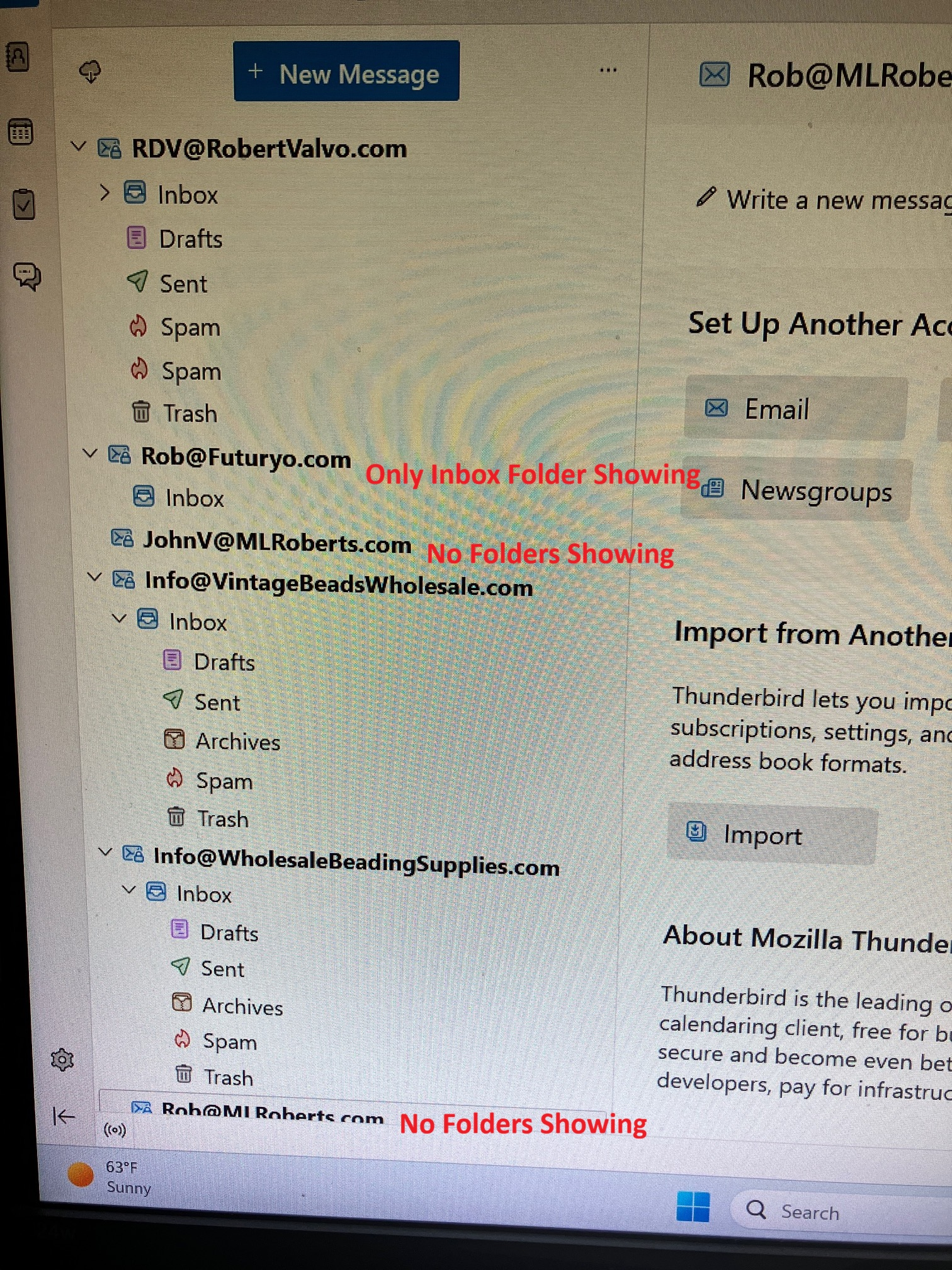
I have also tried Troubleshooting mode and the problems persist in trouble shooting mode. I also uninstalled and re-installed email accounts and Thunderbird in full and the problem still persists...
I didn't know it was a known issue. Please can you help me resolve this? Many Thanks.
Who is your mail provider? What add-ons are installed in Thunderbird?
Provider is TalkTalk. I have no addons.
I have found a work around to bring the folders back into view... Right click on the account name in the left pane that has its folders missing. Subscribe. Click OK. The missing folders will reappear and FB will then resync. Not a solution and resyncing can take a while.
Also, while we are waiting for a fix...don't close FB, just minimise it. The problem only occurs when starting FB.
Folders disappearing and reappearing or not appearing at all problem still exits... Are there any workarounds while we wait for the TB update to fix this...?