


Change in Behaviour of Crashhelper.exe in Firefox v154?
Has there been a change to the way that crashhelper.exe behaves in recent releases of Firefox?
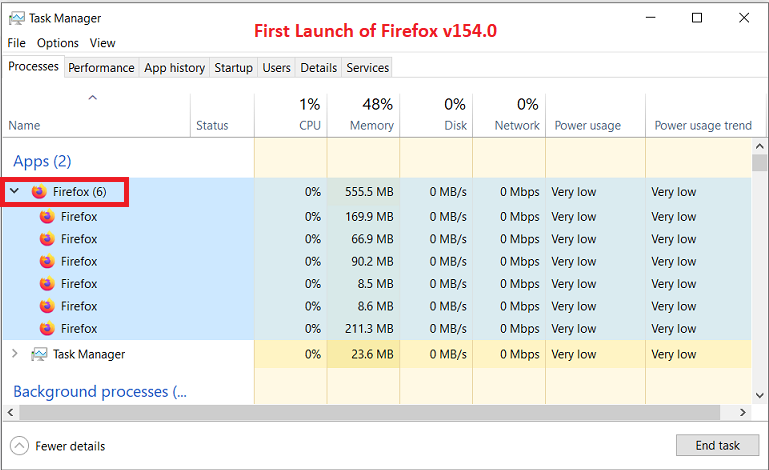
If I disable all my browser extensions in the current Firefox v154.0.0 (rel. 18-Aug-2026) and restart my Win 10 ESU laptop then the first time I launch Firefox with a single tab open (i.e, my Firefox Home page with search and 4 rows of shortcuts) I typically see ~ 6 instances of firefox.exe in Task Manager that all disappear as expected when Firefox is closed.
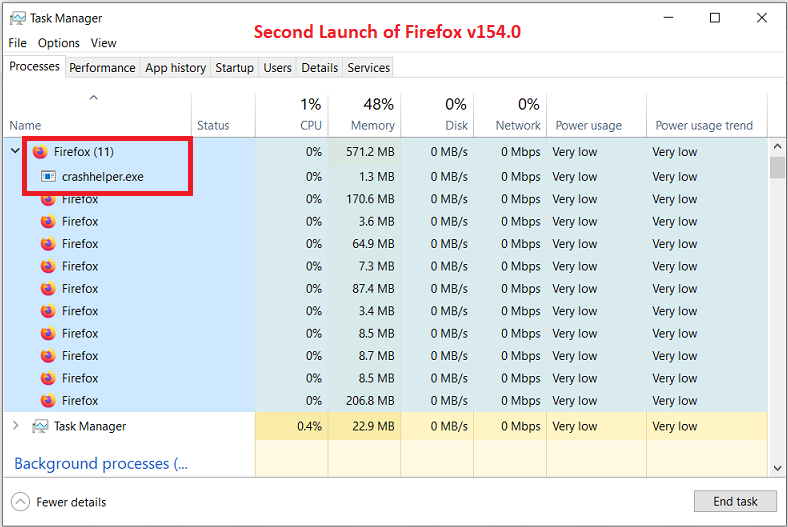
However, if I immediately re-open Firefox I typically see ~ 11 instances of firefox.exe plus an additional process called crashhelper.exe (located in C:\Program Files\Mozilla Firefox) load into memory. On occasion the crashreporter.exe process will also briefly appear in Task Manager and then quickly disappear. All these extra Firefox processes unload from memory as expected when I close Firefox, and if I go to about:crashes or (Help | More Troubleshooting Information | Crash Reports for the Last 3 Days | All Crash Reports) it shows "No crash reports have been submitted" in the past 3 days, so my Firefox browser appears to be working correctly even if crashhelper.exe and crashreporter.exe start running in the background.
NOTE: I can reproduce this behaviour if I prevent Malwarebytes Premium from launching at boot-up (i.e., if Settings | General | Windows Startup | Launch Malwarebytes in the Background When Windows is Started is OFF) and restart my computer, so I don't believe that the appearance of crashhelper.exe (or crashreporter.exe) has anything to do with my Malwarebytes real-time protection.
Dell Inspiron 15 5584 * 64-bit Win 10 Pro v22H2 build 19045.7663 * Firefox v154.0.0 * Microsoft Defender v4.18.26070.9-1.1.26070.7 * Malwarebytes Premium v5.6.5.306-163.0.5714 * Macrium Reflect Free v8.0.7783
All Replies (1)
And you observed this behavior to have changed over the past versions?
Normally these background tasks start after 60sec uptime, to collect any earlier data, check anything in need of processing, check telemetry prefs, queue/batch unsent pings etc. and once they're done they exit — in theory it's possible if they're not left to run in previous launch, they'd launch right away the next time(?) however in both cases, the processes should be pretty much the same at, say, 1m30sec mark, no matter the cadence of restarts (if you rule out other background impact like pending updates triggered by restarts etc.)