


Avoid support scams. We will never ask you to call or text a phone number or share personal information. Please report suspicious activity using the “Report Abuse” option.

আরও জানুন
Open

Cannot login into Shopify using passkeys with the Bitwarden extension

ferares

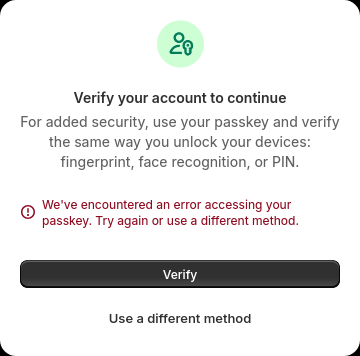
Everyday Shopify asks me to verify my account but when I try to do so using my passkey it fails with the following error message: “We’ve encountered an error accessing your passkey. Try again or use a different method.”

When I hit the “Verify” button I can see a POST request being made to https://accounts.shopify.com/user-verification/passkey?native_app=false&os_name=other&token=XXXXXXXXXX and it gets a 200 response with the following JSON:

``` {

 "result": "error",
 "reason": "user_submission_canceled_passkey",
 "credential_options": {
   "challenge": "YYYYYYYYYYY",
   "timeout": 120000,
   "extensions": {},
   "allowCredentials": [
     {
       "type": "public-key",
       "id": "ZZZZZZZZZZZZZZ"
     }
   ],
   "rpId": "accounts.shopify.com",
   "userVerification": "preferred"
 },
 "selected_method": "passkey",
 "other_info": {},
 "severity": null

} ```

(I’ve redacted some information from the request URL and the response body)

The passkey popup from Bitwarden never opens.

I then use 2FA with my authenticator app and am able to login.

I’m using Firefox 153.0.1 and the Bitwarden extension 2026.7.0.

This used to work fine for me some time ago and I can still use passkeys using Chrome + Bitwarden on the same computer.

I've contacted Bitwarden's support and they tell me the problem resides either with Firefox or with Shopify. I've also posted this issue in Shopify's community forums and people tell me it looks like it's Firefox who's cancelling Shopify's POST request given the "user_submission_canceled_passkey" error code.

Shopify's community forums post: https://community.shopify.com/t/cannot-login-using-passkeys-on-firefox-using-bitwarden/659008
Everyday Shopify asks me to verify my account but when I try to do so using my passkey it fails with the following error message: “We’ve encountered an error accessing your passkey. Try again or use a different method.” When I hit the “Verify” button I can see a POST request being made to https://accounts.shopify.com/user-verification/passkey?native_app=false&os_name=other&token=XXXXXXXXXX and it gets a 200 response with the following JSON: ``` { "result": "error", "reason": "user_submission_canceled_passkey", "credential_options": { "challenge": "YYYYYYYYYYY", "timeout": 120000, "extensions": {}, "allowCredentials": [ { "type": "public-key", "id": "ZZZZZZZZZZZZZZ" } ], "rpId": "accounts.shopify.com", "userVerification": "preferred" }, "selected_method": "passkey", "other_info": {}, "severity": null } ``` (I’ve redacted some information from the request URL and the response body) The passkey popup from Bitwarden never opens. I then use 2FA with my authenticator app and am able to login. I’m using Firefox 153.0.1 and the Bitwarden extension 2026.7.0. This used to work fine for me some time ago and I can still use passkeys using Chrome + Bitwarden on the same computer. I've contacted Bitwarden's support and they tell me the problem resides either with Firefox or with Shopify. I've also posted this issue in Shopify's community forums and people tell me it looks like it's Firefox who's cancelling Shopify's POST request given the "user_submission_canceled_passkey" error code. Shopify's community forums post: https://community.shopify.com/t/cannot-login-using-passkeys-on-firefox-using-bitwarden/659008
স্ক্রিনশটসমূহ সংযুক্ত হয়েছে

You must log in to your account to reply to posts. Please start a new question, if you do not have an account yet.