almost all mails in sub folders of inbox have disappeared

I am really in a panic: Using ubuntu 22.04 and Thunderbird 140.7.1.esr For my main account I keep some 40 sub-folders and sub-sub-folders. All but the most recent mails in my sub folders are gone, something like 4 years of email. I asked chatGPT for help and found inside the /mail folder that most of the files with the names of my sub folders with no extension have 0 kb. I don't use IMAPS because I wanted my mails on my computer so I use only POP. :-( The interesting thing is that this only happend to my main account. I have 6 more accounts in Thunderbird and they seem to be fine, at least for now. Thank you for any help. Kind regards Frank
All Replies (5)

Are the empty sub-folders and sub-sub-folders still displayed in the folder pane or did they vanish, too? Do you have a backup copy of your Thunderbird profile folder ? Did you try a R-click on one of the empty folders > Properties > Repair Folder?
Are the empty (0 kB) files without extension in Mail in the profile folder paired with an *.sbd folder having the same name as the empty file ? Exemple: a file Friends is paired with a file folder Friends.sbd
I guess I've found the problem just now: In disk space the setting delete messages over 30 days old was selected. And actually thew oldest message i can find is from the 17th of January. What I don't understand though is, how this could have become selected. I would have never set an option like that, not willingly. Thank you anyway. Kind regards Frank
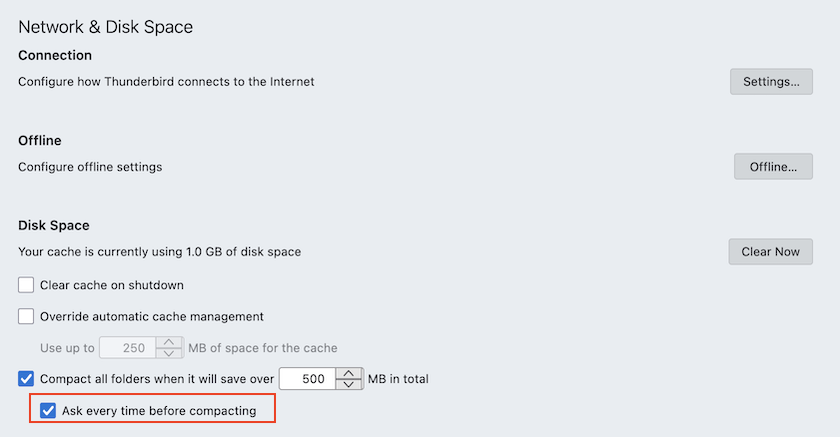
Maybe you will be lucky despite your bad luck! first of all: actually please do not compact folders if Thunderbird prompts you since if you do (or already did that) your old messages are definitively LOST.
I just tested the Disk space setting with over 10 days old in the POP account in one of my test profiles.
As I suspected the older messages were deleted on restart and didn't appear in the Trash folder. But when I opened the Inbox file in the profile folder I saw that the deleted messages were still present in the Inbox file, but marked as déleted by X-Mozilla-Status: 0009
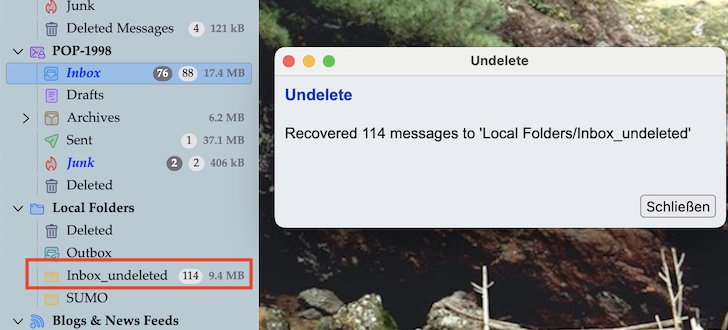
So I installed the extension "Undelete" from here https://www.ggbs.de/extensions/Undelete.html and successfully recovered the deleted messages in a folder Inbox_undeleted in Local folders (see images)
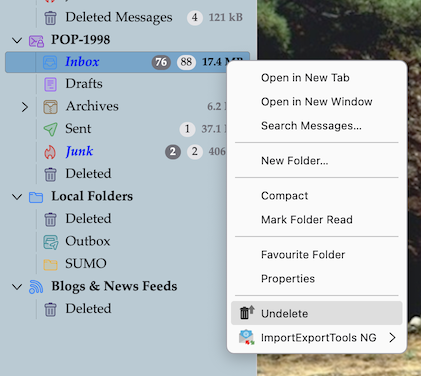
Thank you for you help. I didn't know of "undelete" so thank you for that hint. I tried it on every sub-folder and on every sub-sub-folder but it only recovered 5 files from inbox which I had neither deleted nor moved to the trash. What's more is that not only I don't know how this "Delete Files which are older than 30 days" setting was changed but neither when, which means that some messages may have been deleted quite a while ago which in turn means that they probably have been written over a number of times:-( I will try to recover something from the file system which unfortunately is XFS but I guess that there won't be a lot to recover neither. Thank you for your help Kind Regards Frank from rainy Italy
Don't lament about why, how and by whom the setting of "older than 30 days" has been fixed since you'll never know. It's certainly no bug and any of us will commit an error one day or the other, it's human. The best precaution against such "unwanted errors" is to create regularly backup copies of the Thunderbird profile folder, in particular if you are working with POP accounts.
The result that you couldn't restore the deleted messages with the "Undelete" add-on can easily be explained by the fact that in my test after automatic deletion of a big number of messages older than 10 days Thunderbird prompted me to compact folders which I denied since a knew that thereafter the deleted messages could no longer de recovered. Maybe in your case Thunderbird, depending on your settings for compacting folders, has done the compacting silently without asking you to confirm. Which for me is a reason to never allow compacting silently and without warning me before.