


Windows 10 reached EOS (end of support) on October 14, 2025. If you are on Windows 10, see this article.

সহায়তা খুঁজুন

Avoid support scams. We will never ask you to call or text a phone number or share personal information. Please report suspicious activity using the “Report Abuse” option.

আরও জানুন

Size of subject margin in folder

  • 1 উত্তর
  • 1 এই সমস্যাটি আছে
  • 68 দেখুন
  • শেষ জবাব দ্বারা sfhowes

Hi I've uploaded a screenshot of the messages in one of my folders on Thunderbird. All the columns in my folders are like the Date column shown here: i.e., there is no space between the limits of the column and the information, except in the Subject column, where there's a margin of about one centimeter. It makes no difference whether the Subject is the first column or preceded by another column (such as From). How can I get rid of that space/margin? Any help much appreciated Michael
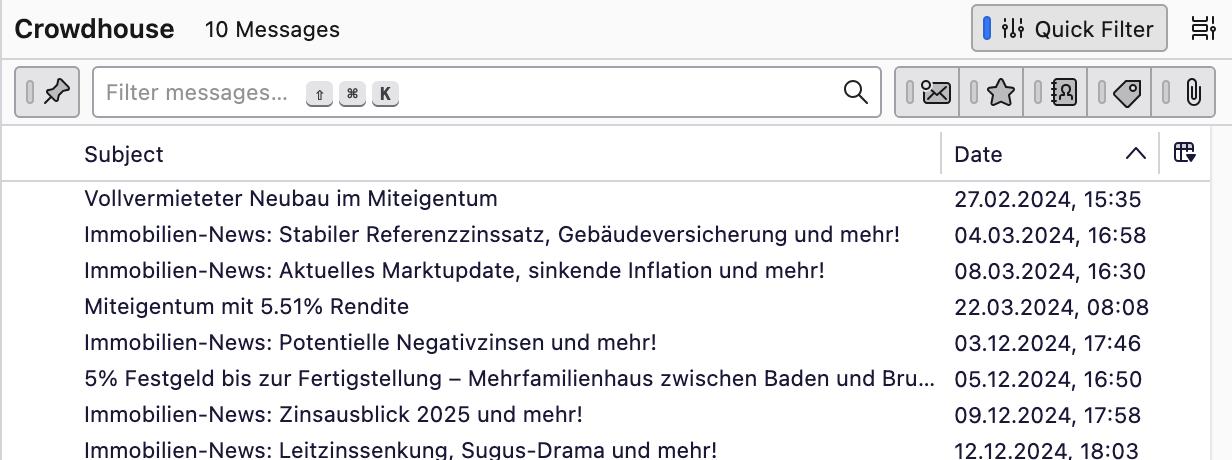
Hi I've uploaded a screenshot of the messages in one of my folders on Thunderbird. All the columns in my folders are like the Date column shown here: i.e., there is no space between the limits of the column and the information, '''except''' in the Subject column, where there's a margin of about one centimeter. It makes no difference whether the Subject is the first column or preceded by another column (such as From). How can I get rid of that space/margin? Any help much appreciated Michael
স্ক্রিনশটসমূহ সংযুক্ত হয়েছে

সমাধান চয়ন করুন

That space is reserved for the icons that indicate a message has been replied to (left arrow) or forwarded (right arrow). See picture.

প্রেক্ষাপটে এই উত্তরটি পড়ুন। 👍 2

All Replies (1)

চয়ন করা সমাধান

That space is reserved for the icons that indicate a message has been replied to (left arrow) or forwarded (right arrow). See picture.