


Remove left side bar
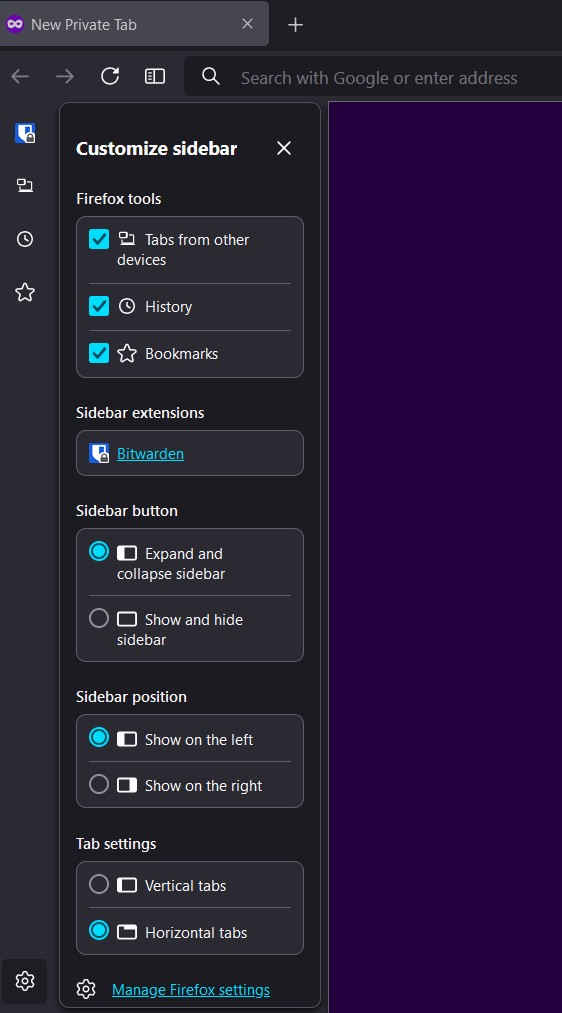
I recently upgraded to the latest version 132.0.2. There's a vertical sidebar on my browser that I would like to remove. I looked into the customize sidebar settings but can't seem to find a way to remove it completely. I've also attached a screenshot. Any guidance would be appreciated. Thanks!
I recently upgraded to the latest version 132.0.2. There's a vertical sidebar on my browser that I would like to remove. I looked into the customize sidebar settings but can't seem to find a way to remove it completely. I've also attached a screenshot. Any guidance would be appreciated. Thanks!
All Replies (1)
You can select "Show and Hide Sidebar" to be able to toggle the sidebar via the "Show sidebar" toolbar button.
- about:config => sidebar.visibility => hide-sidebar
This new feature is controlled by sidebar.revamp in about:config.