

এই থ্রেডটি সংরক্ষিত ছিল।
যদি আপনি সাহায্য চান তাহলে অনুগ্রহ করে একটি নতুন প্রশ্ন জিজ্ঞাসা করুন

মীমাংসিত
সংরক্ষণ করা হয়েছে
How do I get rid of "search for" options in address bar dropdown
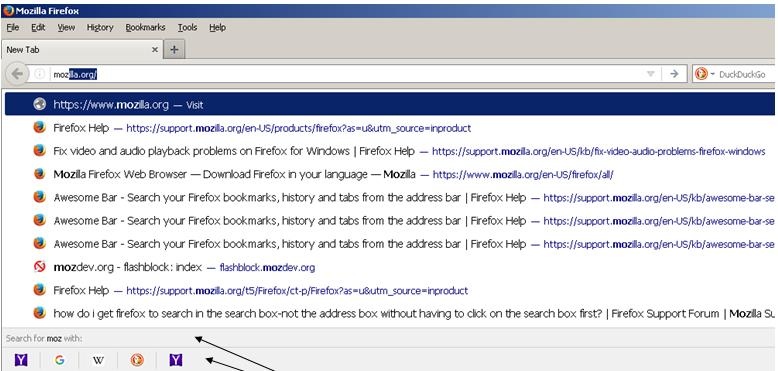
With Firefox 55, whenever I type something in the address bar I get the "Search with" options at the bottom of the drop down. For me, it is completely annoying. I never search with the address bar and have the "Show search suggestions in location bar" option unchecked. If I want to search, I'll use the search box.
With Firefox 55, whenever I type something in the address bar I get the "Search with" options at the bottom of the drop down. For me, it is completely annoying. I never search with the address bar and have the "Show search suggestions in location bar" option unchecked. If I want to search, I'll use the search box.
Craig D. Glasser দ্বারা পরিমিত
All Replies (2)

চয়ন করা সমাধান
- Open about:config in the URL bar and press enter/return.
- Enter browser.urlbar.oneOffSearches (or just search and find this preference) and double-click it to set its value to false.
Another way is to untick all search engines in the Options/Preferences, but they are valid for both the address bar and search bar, and you might want to keep them for the search bar.
Thanks a bunch!