Kukhonjiswa imibuzo ethegiwe:

Firefox does not display background color in option tags

I am trying to use a <select> tag to display a color selector. So each <option> has a background color to match its displayed text: ```<select id="strokeC… (funda kabanzi)

I am trying to use a <select> tag to display a color selector. So each <option> has a background color to match its displayed text:

```<select id="strokeColor" name="strokeColor" style="width: 10em;">

             <option value="black" style="background: #000000; text: #FFFFFF">
                     black
             </option>

<option value="aqua" style="background: #00FFFF">

                     aqua
             </option>

<option value="blue" style="background: #0000FF">

                     blue
             </option>

<option value="brown" style="background: #A52A2A">

                     brown
             </option>

<option value="gray" style="background: #808080">

                     gray
             </option>

<option value="green" style="background: #00FF00">

                     green
             </option>

<option value="magenta" style="background: #FF00FF">

                     magenta
             </option>

<option value="orange" style="background: #FFA500">

                     orange
             </option>

<option value="purple" style="background: #800080">

                     purple
             </option>

<option value="red" style="background: #FF0000">

                     red
             </option>

<option value="white" style="background: #FFFFFF">

                     white
             </option>

<option value="yellow" style="background: #FFFF00">

                     yellow
             </option>

<option value="#000000" selected="" style="background: #000000">

                     #000000
             </option>
         </select>```

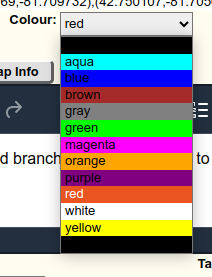
On Chrome this displays as expected:

https://assets-prod.sumo.prod.webservices.mozgcp.net/media/uploads/images/2024-04-18-22-02-25-eebbd5.png

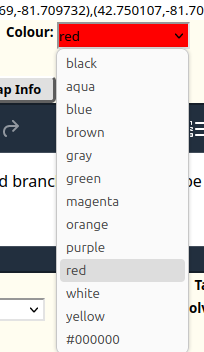
But on Firefox the background colors are ignored:

https://assets-prod.sumo.prod.webservices.mozgcp.net/media/uploads/images/2024-04-18-22-02-35-bd90ee.png

How can I get Firefox to display the background colors?

Okugcinwe kunqolobane 14 324

How to change menu font in version 132

I haven't upgraded browser versions for a while and I'm now going from 109 to 132. Pretty bad I know. I'm having a number of issues but for this post I'd like to concentr… (funda kabanzi)

I haven't upgraded browser versions for a while and I'm now going from 109 to 132. Pretty bad I know.

I'm having a number of issues but for this post I'd like to concentrate on userChrome.css.

In version 109, I had a custom font for the top menu bar, the top menus, the bookmark toolbar, the bookmark toolbar menus, and the right click menus. I did this by including the following in userChrome.css (as per [https://support.mozilla.org/si/questi.../1335097|here]:

  1. navigator-toolbox { font-family:"MyFont" !important }

This worked great, but it is no longer working in version 132. Obviously I don't know in which Firefox version this stopped working.

Has this been disabled by Mozilla or has it been changed? If it's been changed, how can I achieve it now?

I'm very grateful for any help!

Kusonjululiwe Okugcinwe kunqolobane 14 225

New Addons blank on Firefox restart, return when disabled and enabled.

New addons on Firefox become blank on restarting the browser. They return when I manually disable and enable them once. How to fix this? Doesn't happen to older addons. … (funda kabanzi)

New addons on Firefox become blank on restarting the browser.

They return when I manually disable and enable them once.

How to fix this? Doesn't happen to older addons.

Okugcinwe kunqolobane 12 234

Dark mode broken after update

I am on Linux Mint 21.2, and I just updated Firefox (141.0). Now, the bookmarks bar, toolbar, and the tabs (everything above the displayed page), as well as the menu, boo… (funda kabanzi)

I am on Linux Mint 21.2, and I just updated Firefox (141.0). Now, the bookmarks bar, toolbar, and the tabs (everything above the displayed page), as well as the menu, bookmarks menu, and sidebar, are in light mode even though I have dark mode set (They were dark before the update). I tried playing with the Dark Mode settings to no avail. My system is set to dark mode in general. Are others experiencing this? Is there some sort of fix?

Kusonjululiwe Okugcinwe kunqolobane 11 2201

Removal of New "List All Tabs" Button.

A new version of the "List All Tabs" appeared on my toolbar today, shown on the left and hovered over in the attached screenshot (ignore the Malwarebytes extension icon).… (funda kabanzi)

A new version of the "List All Tabs" appeared on my toolbar today, shown on the left and hovered over in the attached screenshot (ignore the Malwarebytes extension icon). The old icon for this button was a chevron with approximately the same functionality. I was able to remove the old icon, but I'm unable to find a way to remove this one. Here is what I've tried so far:

  • Like the old one, the Customize Toolbar feature is unable to remove it since it is grayed out.
  • For a while, I was able to remove the old icon by going to about:config and setting browser.tabs.tabmanager.enabled to false. This solution does not work for the current and some recent versions of the button.
  • I attempted to create a userChrome.css file (following all the steps according to this this website) and added the following string: #alltabs-button { display: none !important; }

None of these attempted fixes have removed the button following a browser restart. Is there a way to remove it? I have no need of a button that shows me what tabs I have open when I can simply look at my toolbar.

Kusonjululiwe Okugcinwe kunqolobane 11 1812

Saving pdfs with Firefox renders them blank in Adobe

I'm trying to use Firefox to fill out my tax forms, but while I can save them and view them with Firefox, they're blank when I open them with Adobe or print them. This is… (funda kabanzi)

I'm trying to use Firefox to fill out my tax forms, but while I can save them and view them with Firefox, they're blank when I open them with Adobe or print them. This is, to say the least, NOT USEFUL. What is happening?!?? I'm using Win10 and the latest version of Firefox, and I tried it on an old Mac with the latest version of Firefox as well.

Okugcinwe kunqolobane 10 217

Firefox 140 - Now have issues with background colors in Sideview bookmarks

Hello all: Just downloaded version 140 and ran into an immediate "visual/appearance" problem with regard to the background color(s) of the sidebar bookmarks view. Many t… (funda kabanzi)

Hello all:

Just downloaded version 140 and ran into an immediate "visual/appearance" problem with regard to the background color(s) of the sidebar bookmarks view. Many themes now have totally dark sidebar colors and not readable (see screenshot image upload with this posting). I always have my bookmarks (almost 1200 of them) displayed in my sidebar, and this is the first time an issue like this has arisen with a Firefox update.

To remedy this scenario, I must use very light colored themes that have a white background when you bring up the sidebar bookmarks. If not, everything is totally dark and unreadable.

Any ideas or help on this one?

Kusonjululiwe Okugcinwe kunqolobane 9 652

Firefox Developer Edition 137.0b5 lost bookmark folders

Dear Mozilla Geeks— As practically every other Firefox user, my bookmarks evolved into a lengthy file system that uses folders to segregate categories of bookmarks. That … (funda kabanzi)

Dear Mozilla Geeks—

As practically every other Firefox user, my bookmarks evolved into a lengthy file system that uses folders to segregate categories of bookmarks.

That is, it used to have this feature.

After the last update all or most of the bookmarks (I can't tell by scrolling down the long list) are devoid of their organizing folders. This puts a great deal of information beyond easy reach. In Mozilla Help topics one is advised to click on the library icon in the toolbar ... only there is no such icon on my copy of Developer's Edition.

Can someone suggest a method or methods to recover the folders?

Some passwords have been lost as well.

Yours Sincerely,

Glen

Kusonjululiwe Okugcinwe kunqolobane 8 90

Modifier Keys will not work at the same time in Developer Edition

I have 2 instances of Firefox: I use stable for all my professional work, and I use Developer Edition (Aurora Channel) for personal things. The stable branch works fine. … (funda kabanzi)

I have 2 instances of Firefox: I use stable for all my professional work, and I use Developer Edition (Aurora Channel) for personal things. The stable branch works fine. In Aurora though, certain key combos will not work. This even persists in troubleshooting (safe) mode.

Specifically, it seems anything using both ctrl+alt will not register alt, only ctrl. alt, alt+shift, and ctrl+shift all seem to work fine, but ctrl+alt and ctrl+alt+shift do not. Again, this works fine in stable, so I am clueless as to why it doesn't work in my other instance.

Another detail is that this happens on multiple websites, not just one. The post prominent one is Google Sheets. In sheets, you can insert the date using `ctrl+;`, the time using `ctrl+shift+;`, and both using `ctrl+alt+shift+;`. Inserting them separately works fine, but both causes only one to insert.

Kusonjululiwe Okugcinwe kunqolobane 7 587

Some sort of Windows only bug when using Ren'Py

When playing any Ren'Py web build on Firefox Windows, the frames freeze while entering inputs. Depending on what is being displayed on screen, sometimes it will still con… (funda kabanzi)

When playing any Ren'Py web build on Firefox Windows, the frames freeze while entering inputs. Depending on what is being displayed on screen, sometimes it will still continue despite the mouse movement, but most things just completely freeze up. Once the inputs stop, the frames will skip ahead to where they should be. This only seems to happen on Windows, as I was told it is not repeatable on Ubuntu using Firefox. This is also not an issue on Chromium based browsers.

Ikhiyiwe Okugcinwe kunqolobane 7 117

FIREFOX FREQUENT CRASHES

I GOT TIRED OF FREQUENT FIREFOX CRASHES (C0000005) IN BOTH THE 64-BIT AND 32-BIT DESKTOP VERSIONS. I HAVE BEEN USING THE 64-BIT VERSION IN WINDOWS 11 (I HAVE A HIGH-END S… (funda kabanzi)

I GOT TIRED OF FREQUENT FIREFOX CRASHES (C0000005) IN BOTH THE 64-BIT AND 32-BIT DESKTOP VERSIONS. I HAVE BEEN USING THE 64-BIT VERSION IN WINDOWS 11 (I HAVE A HIGH-END SAGER LAPTOP WITH 32GB RAM. I INSTALLED THE FREQUENT FIREFOX UPDATES BUT THE PROBLEN PERSISTED EVER SINCE VERSIONS 42X WERE RELEASED. I TRIED THE 32-BIT VERSION BUT THE PROBLEM PERSISTED. FINALLED, I TRIED THE DEVELOPER VERSION: NO MORE CRASHES! I READ THE RESPONSES FROM YOUR CLUELESS STAFF TO OTHER CUSTOMERS WITH THE SAME TROUBLE. THIS IS NOT A WINDOWS ERROR; THIS IS A FIREFOX APPLICATION ERROR. MAYBE SOME OF YOUR FIREFOX DEVELOPER CODERS SHOULD ASSIST THE 32-BIT AND 64-BIT DEVELOPERS. OR, DUMP THE VERSION 4X CODE AND BUILD ON THE MORE STABLE 39X CODE. ALSO, DON'T BLAME WINDOWS FOR FIREFOX APPLICATION ERRORS. AND...NEVER SUGGEST A WINDOWS REINSTALL FOR FIREFOX ERRORS!!!

Okugcinwe kunqolobane 6 369

Firefox crashes without error message

OS: Debian (trixie) Firefox version: 149.0b3 Firefox suddenly crashes without any displayed error. Attempt to troubleshoot it in "safe mode" doesn't help (it also sudd… (funda kabanzi)

  • OS: Debian (trixie)
  • Firefox version: 149.0b3

Firefox suddenly crashes without any displayed error. Attempt to troubleshoot it in "safe mode" doesn't help (it also suddenly crashes.

  • When I had redirected following output: "Exiting due to channel error."
  • after restart, I launched "about:crashes", but there were no entries
Open 6 225

Is it normal FF (developer edition) is consuming more than 2Gb of RAM (with only one tab opened)?

Firefox consumes almost 2Gb of RAM with only one tab open. I find this surprising, and it's a major performance issue for me. Do you have an explanation or solutions to r… (funda kabanzi)

Firefox consumes almost 2Gb of RAM with only one tab open. I find this surprising, and it's a major performance issue for me.

Do you have an explanation or solutions to reduce this memory overconsumption?

Okugcinwe kunqolobane 6 180

UI is not rendering some objects

Hello👋 I am using firefox developers edition on build 132.0b2 and my UI is not rendering correctly, the themes work but the objects like the bookmarks toolbar and the ref… (funda kabanzi)

Hello👋 I am using firefox developers edition on build 132.0b2 and my UI is not rendering correctly, the themes work but the objects like the bookmarks toolbar and the refresh button and the home button even some of my extensions is not loading and other things also not loading, but fortunately I know the keyboard shortcuts for these functions and they are working just fine but all the buttons are just not there My device is a Dell Latitude E7450 and it has a normal core I5 5300U so it is not an x86 arm based processor I hope that you find a solution ASAP as I am really struggling with my browser like this and btw I really love your work and the products that you give Thanks for doing the hard work! bye

Kusonjululiwe Okugcinwe kunqolobane 6 281

Firefox 148.0b2 (64-Bit) Disable search function in address field

Since version 148.0b2 (64-bit), it's once again not possible to enter search terms in the search box of a new tab; instead, the browser searches in the address bar. I've … (funda kabanzi)

Since version 148.0b2 (64-bit), it's once again not possible to enter search terms in the search box of a new tab; instead, the browser searches in the address bar. I've had all the settings I found in the forums configured correctly for over five years, and they haven't changed. - browser.newtabpage.activity-stream.improvesearch.handoffToAwesomebar = False. Despite this, the search still occurs in the address bar. Now I'm back to the awful search in the address bar. How can I fix this? Please fix this bug as soon as possible.

Original: Set der Version 148.0b2 (64-Bit) ist es wieder nicht möglich die Suche im neuen Tap, im Suchfenster einzugeben, sonder es wird wieder im Adressfeld gesucht. Ich habe alle Einstellungen, die ich in den Foren gefunden habe schon über 5 Jahre so eingestelle, sie sind auch nicht geändert. - browser.newtabpage.activity-stream.improvesearch.handoffToAwesomebar = False. Trotzdem wird die Suche im Adressfeld geführt.

Jetzt geht es aber wieder mit der Schrecklichen suchen in der Adresszeile los. Wie kann ich dies ändern? Bitte diesen Fehler (Bug) schnellst möglich beheben.

Kusonjululiwe 6 253

Firefox developer not working since 142.0b2 - tabs do not load on restart of app

Since this week's update of Firefox Developer edition when the browser is restarted tabs do not load until I reset the browser. I suspect an add-on but have not been able… (funda kabanzi)

Since this week's update of Firefox Developer edition when the browser is restarted tabs do not load until I reset the browser.

I suspect an add-on but have not been able to determine which one.

This is happening on multiple (3) physical computers.

I just started a new work role and haven't been able to find the time to troubleshooting of the issue myself.

This has been very disrupting and stressful.

Okugcinwe kunqolobane 5 171

Bookmark favicons consistently disappearing

Basically title. Every time I close the browser and re-open it, the favicons disappear. I use the favicons to navigate to websites on my bookmark toolbar, but they're mis… (funda kabanzi)

Basically title.

Every time I close the browser and re-open it, the favicons disappear. I use the favicons to navigate to websites on my bookmark toolbar, but they're missing from my regular bookmarks, too.

I found an old thread that appeared similar, and the solution was to take a working copy of the favicons.db file and re-import it if it breaks (while the browser application is closed). However, this did not work.

Any help would be greatly appreciated.

Okugcinwe kunqolobane 5 162