


Move menu bar to Bookmarks bar

I'm wondering if it's possible to move the menu bar items to the bookmarks bar, or, if need be, move all the bookmarks bar items to the menu bar and then move the menu bar under the tabs.
There used to be an Add-on called "UI Fixer" that let me do this, but with the new Firefox 29 this is now impossible and the "Classic Theme Restorer" doesn't grant this specific functionality.
被采纳的解决方案
You could move the Bookmarks Toolbar Items to the menu bar and hide the Bookmarks Toolbar and use code in userChrome.css to move the menu bar to a lower position.
Add code to the userChrome.css file below the default @namespace line.
@namespace url("http://www.mozilla.org/keymaster/gatekeeper/there.is.only.xul"); /* only needed once */

#toolbar-menubar {-moz-box-ordinal-group:1000}
The customization files userChrome.css (user interface) and userContent.css (websites) are located in the chrome folder in the Firefox profile folder.
You can use this button to go to the currently used Firefox profile folder:
- Help > Troubleshooting Information > Profile Directory: Show Folder (Linux: Open Directory; Mac: Show in Finder)
所有回复 (4)
Here's a screenshot of what I'm looking for. On the top is what I have right now, on the bottom is an MSPaint version of what would be ideal.

选择的解决方案
You could move the Bookmarks Toolbar Items to the menu bar and hide the Bookmarks Toolbar and use code in userChrome.css to move the menu bar to a lower position.
Add code to the userChrome.css file below the default @namespace line.
@namespace url("http://www.mozilla.org/keymaster/gatekeeper/there.is.only.xul"); /* only needed once */

#toolbar-menubar {-moz-box-ordinal-group:1000}
The customization files userChrome.css (user interface) and userContent.css (websites) are located in the chrome folder in the Firefox profile folder.
You can use this button to go to the currently used Firefox profile folder:
- Help > Troubleshooting Information > Profile Directory: Show Folder (Linux: Open Directory; Mac: Show in Finder)
Woah, that worked! Thanks!
I had to add a few spaces to the right of the tabs because they were colliding with the window controls, but that's minor.
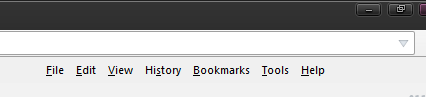
The only problem I have now is that there's a huge gap between "help" and the right edge of the window, which I can't remove via "customize". It's not a huge problem, but still.
See attached screenshot.
Solved it! I installed https://addons.mozilla.org/en-us/firefox/addon/hide-caption-titlebar-plus-sma/ and it works great now.