


Display Images

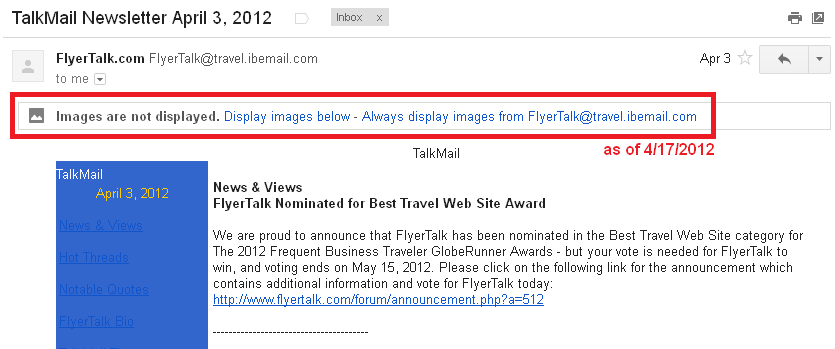
I use Firefox 10.0.2 under XP Pro SP3 to see my Gmail account. Selected email messages show a banner that says "Images not displayed."
Is there a way to display all images by default in email (there is a link that allows me to always see images from the sender of that specific message)? Is this a Firefox issue? Or gmail?
所有回复 (5)
选择的解决方案
According to GMail help: "At the moment, you can't set Gmail to display all images from any sender; you must do this on a per-contact basis."
Source: I can't see images in a message - Gmail Help
UPDATE APRIL 17, 2012: The feature of enabling images by sender now appears in Gmail!
由jscher2000 - Support Volunteer于修改
Many thanks.

I can get the same email on Internet Explorer to show the image but can't on Firefox. However, in Firefox when I select "reply" the image shows up. I use gmail in both cases. But in both IE and Firefox I do not see the options to view images or not view images like I have seen in earlier versions of gmail. I currently use Firefox 11 and IE 9.
由ntalsoe于修改
Hi bnet, that's odd because your Gmail settings should be applied in both browsers...
Are you using any add-ons that selectively block images, such as AdBlock Plus or similar?
If you right click an image in IE that doesn't display in Firefox, and choose Properties, does the image have a secure (HTTPS) URL, matching the secure (HTTPS) URL of Gmail itself? IE and Firefox might treat "mixed" (secure/not secure) content differently.
Edit: The Gmail setting to block or not block images is named "External Content". You can access it here:
Gear logo > Settings > General tab
Currently, your choices do not include "show everything" but only:
_ Always display external content (such as images) sent by trusted senders
_ Ask before displaying external content
由jscher2000 - Support Volunteer于修改
I had the box checked in IE show all images and it seems to work ok in IE. But it still won't display in Firefox