


Cannot save card #'s on CIBC and TD bank websites.

Internet banking at CIBC and TD Canada Trust allows the choice to remember your card number so each time you enter the site you just enter your password. I can no longer do this from my home computer. At my office this is not a problem and I was able to use this feature from home until recently. How do I correct this problem?
被采纳的解决方案
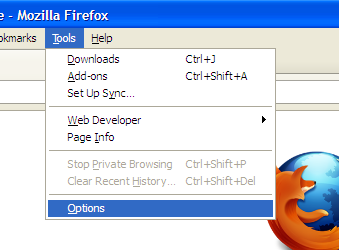
Check your privacy setting in Firefox. - Select 'Tool'. - Select 'Options' in drop down list. - Select 'Privacy' tab. - check the 'History' setting. 'Never remember history' will disable the 'remember your card number' in the site. 'Remember history' will allow 'remember your card number'.
定位到答案原位置 👍 1所有回复 (2)
选择的解决方案
Check your privacy setting in Firefox. - Select 'Tool'. - Select 'Options' in drop down list. - Select 'Privacy' tab. - check the 'History' setting. 'Never remember history' will disable the 'remember your card number' in the site. 'Remember history' will allow 'remember your card number'.

See also:
- Tools > Options > Privacy > History: "Remember search and form history"
- https://support.mozilla.org/kb/Form+autocomplete