


Preferences advanced tab, network, missing the line "Your cache is currently using xx MB of space." Netflix won't stream.

Netflix stopped streaming via silverlight. Tried extension, plugins check and reinstall, new profile, reinstalled firefox, upgraded to 8.0, all without resolve. Noticed missing line in prefs while clearing cache.
所有回复 (13)
Make sure that you do not run Firefox in permanent Private Browsing mode.
To see all History and Cookie settings, choose: Firefox > Preferences > Privacy, choose the setting Firefox will: Use custom settings for history
- Deselect: [ ] "Always use private browsing mode"
Thanks. That wasn't it. The choice was deselected.
Is the disk cache enabled?
I have not found the "switch." So I must assume "yes."
Did you open the about:config and checked the value of the browser.cache.disk.enable pref?
To open the about:config page, type about:config in the location (address) bar and press the "Enter" key, just like you type the url of a website to open a website.
If you see a warning then you can confirm that you want to access that page.
- Use the Filter bar at to top of the about:config page to locate a preference more easily.
- Preferences that have been modified show as bold (user set).
- Preferences can be reset to the default via the right-click context menu if they are user set
- Preferences can be changed via the right-click context menu: Modify (String or Integer) or Toggle (Boolean)
Got in ; it is enabled. There is a line that says "browser.cache.disk.smart_size.first_run;false" followed by "browser.cache.disk.smart_size_cached_value;640000." Both are user enabled. Disk cache size was user set to 1048576.
Thanks for your continued help.
Do you see on the about:cache page that the cache is used?
You can open about:xxxx pages via the location bar like you open a website.
Memory cache device Number of entries: 111 Maximum storage size: 30720 KiB Storage in use: 1493 KiB Inactive storage: 1493 KiB
Is what I see. Seems to be a difference in storage size between this page and the prior page ("Disk cache size was user set to 1048576")?
You didn't mention the browser.cache.disk.enable pref above.
Is that pref set to true?
Are you sure that you aren't in Private Browsing mode?
Do you see a Start Private Browsing entry in the Firefox menu?
browser.cache.disk.enable is true; I am not in Private Browsing - That is available under Tools menu and will start and stop OK.
Can you attach a screenshot of the about:config page with in the Filter cache?
Here it is.
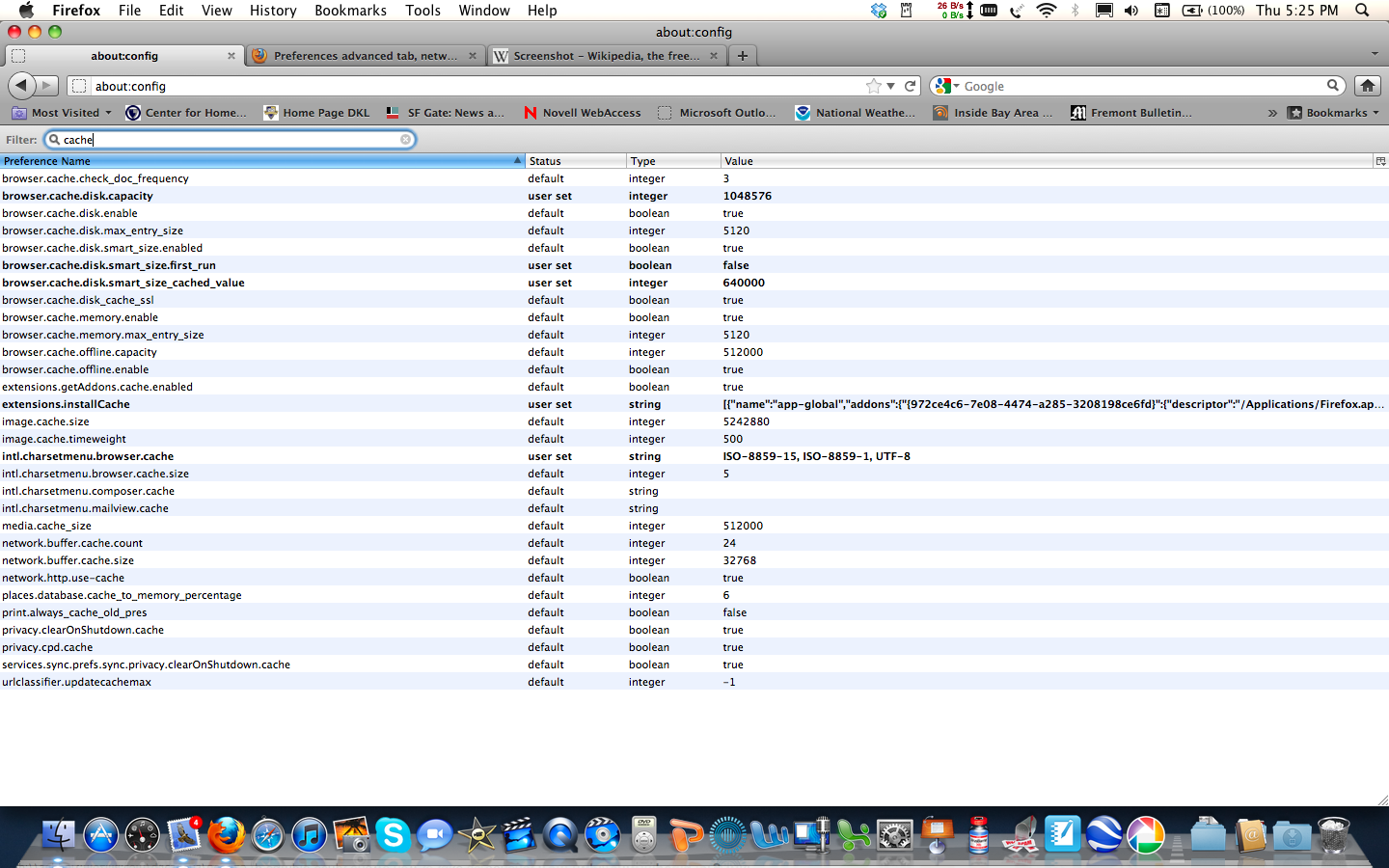
That looks OK to me.
You can check the location(s) where the cache should be and delete the Cache folder.
If you see a cache folder in the profile folder then delete that folder.
- Help > Troubleshooting Information > Profile Directory: Open Containing Folder
You can also look in this location:
MAC: /Users/<username>/Library/Caches/Firefox/Profiles/<profile>/Cache