


Why does the print on certain websites overlap?

When accessing certain websites, the print overlaps other print on the page so that links are not correct and print is unreadable. It happens with the AOL homepage and the internal pages - portal- of my school, Capitol College.
所有回复 (3)
Is this related to the issue you posted here about 9 months ago?
https://support.mozilla.com/en-US/questions/766147
Did you install one of the two extensions that I mentioned then?
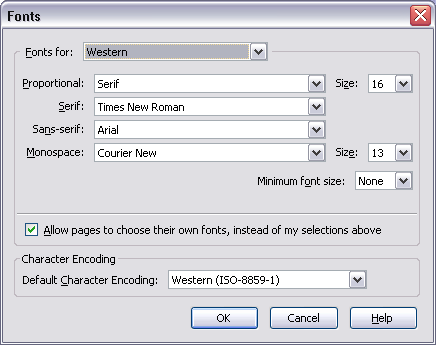
Any chance that you changed the default Font Size settings in Tools > Options --> Content - Fonts & Colors = Advanced ?
See the default settings in the screenshot below.
I did not ask any previous questions. Yes, I have changed font size. I'll see if changing it back makes a difference. If that's the problem, I'll just have to live with it as the larger font is much more comfortable to read. Thanks for the suggestion.
If you need a a larger size font on some webpages, see this: https://support.mozilla.com/en-US/kb/Page+Zoom
The Firefox Page Zoom feature does a domain by domain level of saving the users preferred zoom level settings, there is no default Page Zoom level setting in Firefox.
Try the Default FullZoom Level extension:
https://addons.mozilla.org/en-US/firefox/addon/6965
Or the NoSquint extension:
https://addons.mozilla.org/en-US/firefox/addon/2592/