


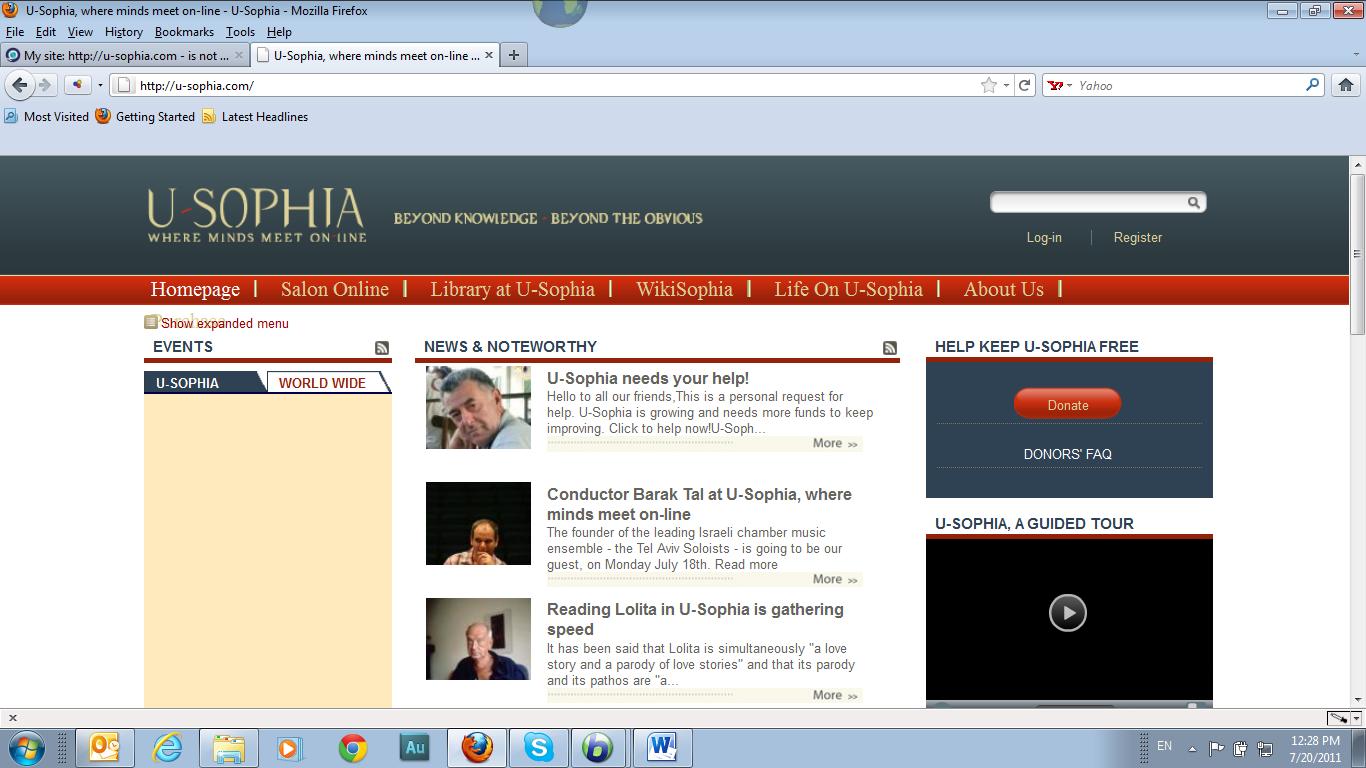
My site: http://u-sophia.com - is not showing right on Firefox (one tab on the navigation "disappears") COuld you advise?

The site (http://u-sophia.com shows correctly on IE9 and Chrome. In Firefox' on of the tabs in navigation bar - at the extreme right hand side - doesn't show.
被采纳的解决方案
Can you attach a screenshot?
Use a compressed image type like PNG or JPG to save the screenshot and make sure that you do not exceed the maximum file size (1 MB).
If you have increased the minimum font size then try the default setting "none" as a high value can cause issues like you described.
- Tools > Options > Content : Fonts & Colors > Advanced > Minimum Font Size (none)
- Tools > Options > Content : Fonts & Colors > Advanced > [X] "Allow pages to choose their own fonts, instead of my selections above"
所有回复 (3)
选择的解决方案
Can you attach a screenshot?
Use a compressed image type like PNG or JPG to save the screenshot and make sure that you do not exceed the maximum file size (1 MB).
If you have increased the minimum font size then try the default setting "none" as a high value can cause issues like you described.
- Tools > Options > Content : Fonts & Colors > Advanced > Minimum Font Size (none)
- Tools > Options > Content : Fonts & Colors > Advanced > [X] "Allow pages to choose their own fonts, instead of my selections above"
HI Cor-El thanks for your interest. I have attached a printscreen of the problem
Thanks, your suggestions solved the problem!