


Windows 10 已于2025年10月14日停止支持。如果您正在使用 Windows 10,参见 这篇文章

Windows 10 reached EOS (end of support) on October 14, 2025. If you are on Windows 10, see this article.

搜索 | 用户支持

防范以用户支持为名的诈骗。我们绝对不会要求您拨打电话或发送短信,及提供任何个人信息。请使用“举报滥用”选项报告涉及违规的行为。

详细了解
已存档

Dark theme in Linux screws up Firefox 4.0, help with userContent.css file

Aleksej 已回复
gfx010

OS: Fedora 14 x86_64 / Gnome 2.3x Problem with: Firefox 4.0

Using dark gtk themes changes the background color of common form controls (input boxes, text boxes, radio buttons, etc...) into the same dark color used in the theme, so you end up with dark controls with black text, which makes them unreadable.

While searching I found that there's a way to make Firefox override the system colors, and that is by creating a userContent.cs file.

Here's the userContent.css file:

===============

body {

background-attachment: scroll !important;

}

input {

border: 2px inset white;

background-color: white;

color: black;

-moz-appearance: none !important;

}

textarea {

border: 2px inset white;

background-color: white;

color: black;

-moz-appearance: none !important;

}

select {

border: 2px inset white;

background-color: white;

color: black;

-moz-appearance: none !important;

}

input[type="radio"],

input[type="checkbox"] {

border: 2px inset white ! important;

background-color: white ! important;

color: ThreeDFace ! important;

-moz-appearance: none !important;

}

.*|*::-moz-radio {

background-color: white;

-moz-appearance: none !important;

}

button, input[type="reset"], input[type="button"], input[type="submit"] {

border: 2px outset white;

background-color: #eeeeee;

color: black;

-moz-appearance: none !important;

}

body {

background-color: white;

color: black;

display: block;

margin: 8px;

-moz-appearance: none !important;

}

===============

This css code fixes text boxes, input boxes, etc... but I still have dark radio buttons, dark check boxes, and dark drop down menus, does anyone know what might be causing this problem?


Examples: http://i901.photobucket.com/albums/ac211/0xGFX007/001.png
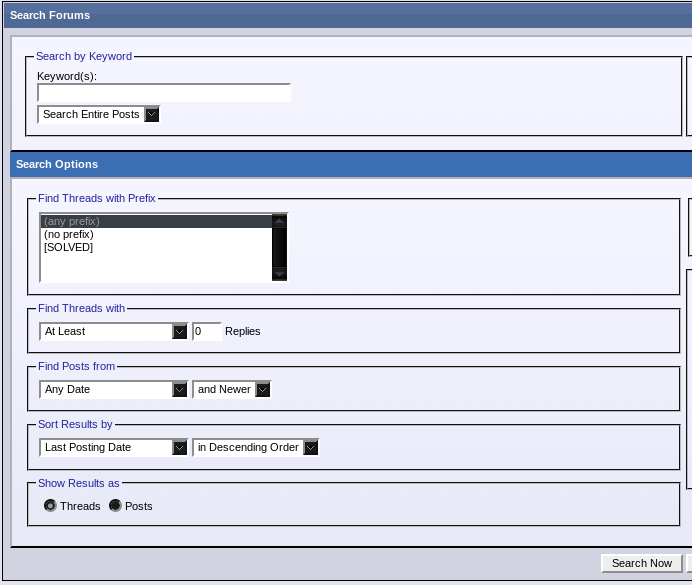
http://i901.photobucket.com/albums/ac211/0xGFX007/002.png

OS: Fedora 14 x86_64 / Gnome 2.3x Problem with: Firefox 4.0 Using dark gtk themes changes the background color of common form controls (input boxes, text boxes, radio buttons, etc...) into the same dark color used in the theme, so you end up with dark controls with black text, which makes them unreadable. While searching I found that there's a way to make Firefox override the system colors, and that is by creating a userContent.cs file. Here's the userContent.css file: =========================== body { background-attachment: scroll !important; } input { border: 2px inset white; background-color: white; color: black; -moz-appearance: none !important; } textarea { border: 2px inset white; background-color: white; color: black; -moz-appearance: none !important; } select { border: 2px inset white; background-color: white; color: black; -moz-appearance: none !important; } input[type="radio"], input[type="checkbox"] { border: 2px inset white ! important; background-color: white ! important; color: ThreeDFace ! important; -moz-appearance: none !important; } .*|*::-moz-radio { background-color: white; -moz-appearance: none !important; } button, input[type="reset"], input[type="button"], input[type="submit"] { border: 2px outset white; background-color: #eeeeee; color: black; -moz-appearance: none !important; } body { background-color: white; color: black; display: block; margin: 8px; -moz-appearance: none !important; } =========================== This css code fixes text boxes, input boxes, etc... but I still have dark radio buttons, dark check boxes, and dark drop down menus, does anyone know what might be causing this problem? Examples: http://i901.photobucket.com/albums/ac211/0xGFX007/001.png http://i901.photobucket.com/albums/ac211/0xGFX007/002.png

所有回复 (2)

Try to ask in this mozillaZine forum thread about "Fx4 .css tweaks":

FWIW, an alternative to going back to a light theme for whatever reason: there is a theme with several variations called "Shiki-Colors", in which only half of the stuff is dark.