

话题已存档。
如果需要帮助请提出新问题。

已存档
Stop Autoscroll with a scroll of a wheel

Is it possible to set autoscrolling in Firefox 4 like it was in Firefox 3.x? (Procedure: 1. middle click on a mouse wheel to start scrolling 2. move mouse up or down to desired position 3. scroll wheel to stop scrolling ) instead of (default for Firefox4): 1. middle click on a mouse wheel to start scrolling 2. move mouse up or down to desired position 3. middle click on a mouse wheel to stop scrolling
Is it possible to set autoscrolling in Firefox 4 like it was in Firefox 3.x?
(Procedure:
1. middle click on a mouse wheel to start scrolling
2. move mouse up or down to desired position
3. scroll wheel to stop scrolling
)
instead of (default for Firefox4):
1. middle click on a mouse wheel to start scrolling
2. move mouse up or down to desired position
'''3. middle click on a mouse wheel to stop scrolling'''
所有回复 (2)
Go to options=>Advanced, in General Tab under Browsing section, you can turn on or off the auto scrolling feature.
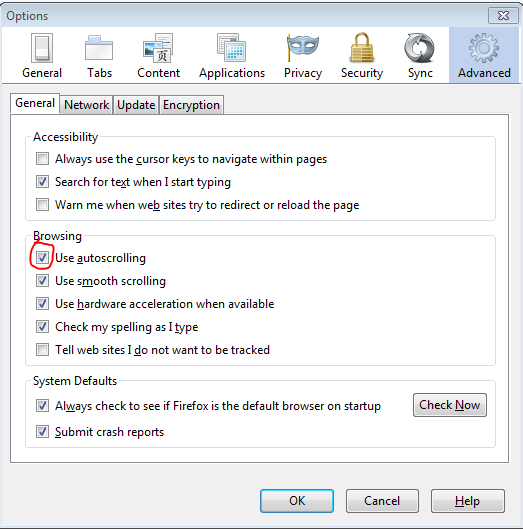
由leoduan于修改
I still want the autoscroll functionality, I just want to stop scrolling with a turn of a wheel instead of clicking it.