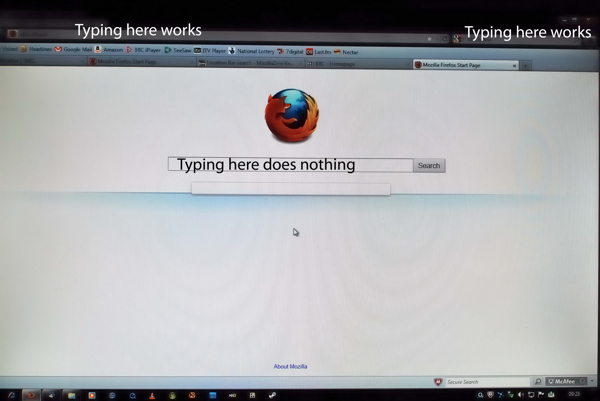
When on the start page typing a search in the box below the FF logo does nothing when I hit enter

PC with Windows 7 professional. When on FF4 start up page and I type in a search ie BBC News into the box below the FF logo and hit enter or press the search button next to the box nothing happens. All my existing bookmarks work, typing a URL into the box at the top or typing a search in the Google search bar top right also work just the main FF search box doesn't do anything.
所有回复 (2)
You can modify the pref keyword.URL on the about:config page to use a Google Lucky search.
Sorry I read the links but did not understand them as I'm not that computer literate. I've just realised you can add an image so you can see my problem. So I'm now ignoring the search bar below the large FF logo in the centre of the screen and just using the URL and Google search boxes at the top of the screen as these work fine. Thanks for the time you took to help.